
Services
Strategy
We find the clearest path from what your business needs to what your website should do.
What’s included
- Page strategy
- Landing page strategy
- Site architecture
- Content planning
- Wireframes
- Migration planning




Branding
We shape a distinct visual identity that works on screen first and carries through everything you make.
What’s included
- Visual identity
- Brand refresh
- Colour & typography
- Moodboards & direction
- Brand guidelines
- Digital brand systems
Recent work


Design
We turn the plan into a distinct, usable design that feels right for your brand and works across every screen.
What’s included
- Website design
- UI design
- Responsive design
- Design systems
- Visual direction
- Content presentation


Development
We build fast, reliable websites in Webflow or with custom code, with the integrations each project needs.
What’s included
- Webflow development
- Custom website development
- Custom interactions
- Performance engineering
- CRM & email integrations
- Booking & payments


SEO & AI search
We make your site easy for search engines and AI assistants to find, understand and point people to.
What’s included
- Technical SEO
- AI search & AEO
- Structured data
- Answer-ready content
- Core Web Vitals
- AI crawler access
Optimisation
We keep improving what happens after launch, using real behaviour data to turn more visitors into enquiries.
What’s included
- Conversion optimisation
- A/B changes
- Landing pages
- Copy reworks
- Analytics & heatmaps
- Monthly improvements
Recent work
Latest
The newest posts, across every topic.



Design
Planning and designing websites, and the tools we use.

Development
Webflow, Astro, Claude Code, CMS choices and what builds really take.


SEO & AI search
Getting found in Google and quoted by AI assistants.



Studio
How we run projects, from proposals to launch week.



Webflow for marketing teams: a complete guide
Everything we’ve learned building Webflow sites marketing teams run themselves: choosing it, scoping, migrating, publishing, markets, launch and search.
- Written by
 Matthew Bishop
- Published
- Reading time
- 8 minutes
Webflow gives a marketing team a website it can run itself. Pages are built from the site’s own components, the CMS holds the blog, case studies and resources, and hosting, security and updates come with the plan, so the team publishes without waiting on a developer.
This guide brings together what we’ve learned building Webflow sites for marketing teams, from deciding on the platform to the months after launch, with a link to the detailed guide and the real projects behind each part.
We’re a Webflow Premium Partner, and every project below is one we’ve built.
1. Is Webflow right for your team?
For most B2B marketing sites, yes. The teams who come to us wanting off WordPress tell the same story: the editor is clunky, the plugins never stop needing updates, every third-party plugin is a security risk and more code weighing the site down, and the pages end up looking like a template. Webflow removes the upkeep and gives the team a visual editor built around its own design system.
WordPress still suits some sites. A big publication with an established editorial team, or a site that depends on a plugin nothing else replaces, may be better staying put.
Read more: Webflow vs WordPress for B2B marketing teams, with a side-by-side comparison and the move Altus made from WordPress in 18 weeks. Weighing a site built as code instead? See Webflow vs Astro and Webflow vs Next.js. For where Webflow is heading, see What is Source by Webflow, and what changes? Comparing builders? See Framer vs Webflow.
2. Scoping and budgeting the project
The platform is the small, predictable part of the budget. The project work depends on scope: how many page templates the site needs, how much content moves across, what the site connects to, and how many countries or languages it covers.
We plan builds for two and a half to three months. When one runs longer, it’s usually waiting on copy or approvals rather than on design or development, so having content ready, and someone to sign it off, is the biggest thing you control.
Read more: How much does a website cost in Australia?, with a worksheet to fill in and nine of our projects side by side, and Webflow project benchmarks, with pages, markets, redirects and CMS content across seven builds. For the platform itself, see Webflow pricing: which plan you need. Choosing who builds it? See Australia’s Webflow Premium Partners, with the questions to ask a Webflow agency.
3. Moving your site to Webflow
A move to Webflow is four jobs: mapping your content into Webflow’s CMS, deciding what happens to every old address, replacing what your plugins did, and checking it all on staging before the domain moves. Some content always moves by hand. Altus’s page-builder exports came out as little more than layout code, so its blog, case studies and integrations were moved and checked one by one.
Redirects follow the old site, not the new one. Altus needed only a handful, because its addresses barely changed. Fresh Clinics needed 324, and Smokeball’s Australian and UK sites 399 and 246.
Read more: WordPress to Webflow migration: how to do it, seven steps from taking stock to the week after launch, and website migration SEO, on keeping your rankings through a move or a rebrand. Keeping HubSpot? See how to connect HubSpot forms to Webflow. Choosing a form tool? See Webflow forms: native, HubSpot or Salesforce?
4. How your team runs the site
The point of Webflow for a marketing team is that the team builds the pages. A new page starts from a template, sections are added from the component library, the copy, images and links are filled in, and the page is checked on staging before it goes live. Roles decide who can do what: marketers build and edit pages, while styles, components and site-wide code stay with whoever looks after the design system.
At Endeavour Lotteries, the marketing team builds its campaign pages from about 20 components, and we build the ones that need something new. Since its training, a month after launch, Altus’s team builds pages and publishes posts in English and German on its own, and comes back to us for new components and technical features.
Read more: Can marketers use Webflow without developers?, including what still needs a developer and how AI is changing that. Running a lot of campaigns? See Webflow Campaigns: what it is and who it suits. Working with AI agents? See Webflow MCP: what it does and how we use it. Structuring your content? See Webflow CMS: how to structure it.
5. More than one country or language
Webflow handles several markets in three ways: translated versions of one site, regional versions of one site for different country offers, or separate sites built from a shared component library.
- Translated locales: Altus added German under /de with Webflow Localization, with translated addresses and a language switch on every page.
- Regional versions: Fresh Clinics and Smileyscope each run Australian and US versions from one Webflow site, with different wording for each market.
- Separate sites on one library: Smokeball runs three sites, because each country has its own marketing team and growth playbook, and each site kept its own domain through the migration.
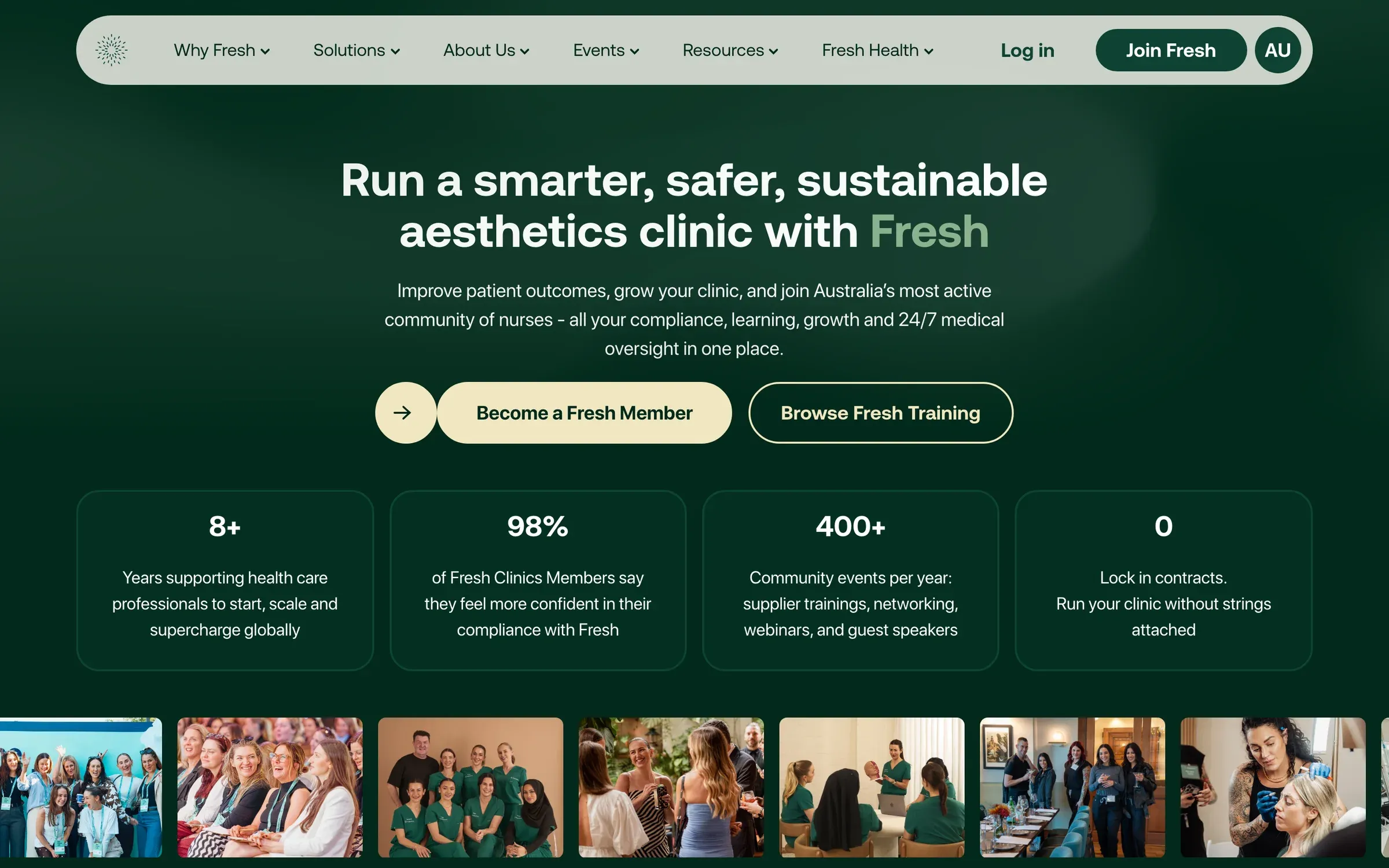
Fresh Clinics’ Australian home page, one of two regional versions, Australia and the US, of the same Webflow site.
Read more: Multi-country websites: one site or several?, with what to settle before you choose. Ready to add a language? See Webflow Localization: how to set it up.
6. Launch, and the months after
Launch is where the useful part starts. For the first week we watch the site closely, submit the sitemap, test every form through to the CRM, spot-check redirects and keep the staging copy out of search. Then we train the team, with recorded walkthroughs to come back to.
After that, sites usually grow rather than get fixed: new components, landing pages for the next campaign, FAQ and event pages, filters for a growing collection. Ongoing support is studio time reserved each month for that work. Hosting is your own Webflow plan, billed to you, and the finished site is yours.
Read more: Website launch checklist: the first week live, Webflow maintenance: what support includes, and how ongoing optimisation works.
7. Being found in search and AI answers
Webflow gives you clean, fast pages, editable titles and descriptions, structured data and sitemaps, which are the foundations search engines and AI assistants both rely on. The rest is writing: the answer first, one question per section, and specific facts with sources. There’s no special trick for AI search, and no one can promise a citation.
Read more: Webflow SEO: is it good, and how to set it up, with the settings to get right at launch and a checklist for every new page, Webflow Lighthouse score: how to improve it, with the fonts, scripts and settings that slow sites down, and writing pages that AI assistants can quote, with what we did on our own site. Or see our SEO & AI search service.
8. Webflow for healthcare teams
Healthcare sites carry more: referenced clinical claims, advertising rules on testimonials, review by compliance advisers, privacy for health information, and audiences from patients to clinicians. Webflow works well here because the team can make an approved change quickly, without a developer in the loop.
Read more: Healthcare website checklist for Australia, and our work for healthcare teams.
The Webflow sites behind this guide
| Project | What we built in Webflow |
|---|---|
| Smokeball | Three regional sites on one library of 248 components, launched on the same day |
| Fresh Clinics | One site for Australia and the US, moved off HubSpot’s CMS with 324 redirects |
| Altus | A move from WordPress, now in English and German and run by the marketing team |
| Skip | A rebrand rebuild on a new domain, with every article carried across |
| Smileyscope | Australian and US versions from one site, launched for World Health Expo |
| Endeavour Lotteries | A Membership site in six weeks, then campaign pages the team builds |
| Econohealth | A new brand and site, live nine days after the designs were approved |
| Doctor Canna | A redesign and rebuild for a nationwide telehealth clinic |
Questions we get asked
What is Webflow best for?
Marketing websites that a team wants to run itself: company sites, campaign and landing pages, blogs, case studies and resources. The team builds pages from the site’s own components and publishes without a developer, while Webflow handles hosting, security and updates.
Can marketing teams use Webflow without relying on developers?
Yes, once the site is built from components and the team is trained. Endeavour Lotteries’ team builds its own campaign pages, and Altus’s team publishes in two languages on its own. New components and technical features still come back to a developer.
How long does a Webflow build take?
We plan most builds for two and a half to three months from kickoff to launch. Smaller sites can be quicker: Econohealth went live nine days after its designs were approved. When a project runs longer, it’s usually waiting on copy or approvals.
Is Webflow good for SEO?
Yes. It gives you fast, clean pages, editable titles and descriptions, structured data, sitemaps and redirects. Rankings still depend on what the pages say and who links to them, and a migration needs every old address redirected.
Do professionals use Webflow?
Yes. Webflow is used by in-house marketing teams and agencies for company websites. The sites in this guide include legal software sold in three countries, a clinic network in Australia and the US, and project management software for Microsoft 365, each run day to day by its own marketing team.
If you’re weighing up Webflow for your team, tell us about your site. Our Webflow development page sets out how a build runs.