
Services
Strategy
We find the clearest path from what your business needs to what your website should do.
What’s included
- Page strategy
- Landing page strategy
- Site architecture
- Content planning
- Wireframes
- Migration planning




Branding
We shape a distinct visual identity that works on screen first and carries through everything you make.
What’s included
- Visual identity
- Brand refresh
- Colour & typography
- Moodboards & direction
- Brand guidelines
- Digital brand systems
Recent work


Design
We turn the plan into a distinct, usable design that feels right for your brand and works across every screen.
What’s included
- Website design
- UI design
- Responsive design
- Design systems
- Visual direction
- Content presentation


Development
We build fast, reliable websites in Webflow or with custom code, with the integrations each project needs.
What’s included
- Webflow development
- Custom website development
- Custom interactions
- Performance engineering
- CRM & email integrations
- Booking & payments


SEO & AI search
We make your site easy for search engines and AI assistants to find, understand and point people to.
What’s included
- Technical SEO
- AI search & AEO
- Structured data
- Answer-ready content
- Core Web Vitals
- AI crawler access
Optimisation
We keep improving what happens after launch, using real behaviour data to turn more visitors into enquiries.
What’s included
- Conversion optimisation
- A/B changes
- Landing pages
- Copy reworks
- Analytics & heatmaps
- Monthly improvements
Recent work
Latest
The newest posts, across every topic.



Design
Planning and designing websites, and the tools we use.



Development
Webflow, Astro, Claude Code, CMS choices and what builds really take.
SEO & AI search
Getting found in Google and quoted by AI assistants.



Studio
How we run projects, from proposals to launch week.



How to build a multi-location website
How to build a website for a business with several locations: one site or many, location pages that rank, routing enquiries, schema and Webflow CMS setup.
- Written by
 Matthew Bishop
- Published
- Reading time
- 5 minutes
For a business with several gyms, clinics, stores or franchise sites, build one website with a page for each location, not a separate site for each. Give every location page its own real content: address, hours, photos, team, services and a way to book or enquire that reaches that location. Link each Google Business Profile to its own location page, add LocalBusiness structured data, and send every enquiry to the right team automatically. In Webflow, that’s a Locations collection in the CMS and one template page.
We built RAYS Wellness’s site for its Brisbane store, then added South Melbourne when the second store opened, with prescription uploads routed to the right store. Here’s how we’d structure a site for two locations or two hundred.
One site, or a site per location?
One site, almost always. A single domain builds authority for every location at once, the brand stays consistent, and there’s one site to keep up. Separate sites per location split that authority and multiply the upkeep, and Google lists “multiple domain names or pages targeted at specific regions or cities that funnel users to one page” as doorway abuse in its spam policies (Google).
The exception is a franchise where each owner runs their own marketing. Even then, location pages on the main site, with sections each franchisee can edit, usually work better than a set of microsites.
Structure the location pages
A simple, browsable hierarchy works for any number of locations:
- A locations page listing every location, grouped by state or region once there are more than a handful, with a map or a search by suburb or postcode.
- A page for each location, at an address like /locations/fortitude-valley. Once you pass a few dozen, group them by state: /locations/qld/fortitude-valley.
- Links in from the rest of the site: the navigation, the footer, and any page about a service that location offers.
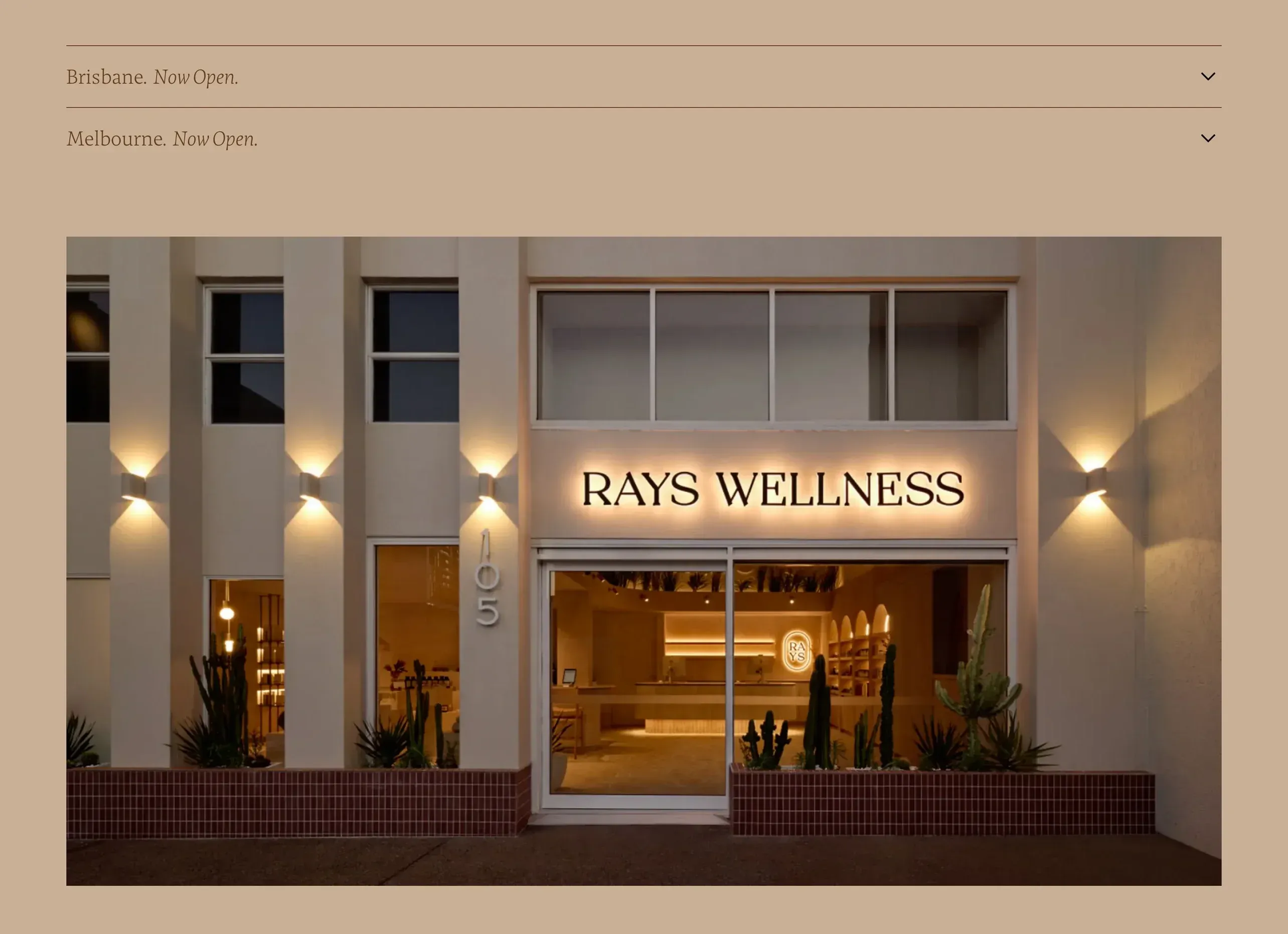
RAYS Wellness’s locations section: Brisbane and Melbourne on one site, each with its address, hours and contacts.
What goes on each location page
The difference between a location page that ranks and a doorway page is whether it’s genuinely useful to someone choosing that location. Include:
- The basics, exactly as on Google: name, address, phone and opening hours, matching the location’s Google Business Profile.
- Real photos of that location, not the same stock image on every page. RAYS shows its Fortitude Valley shopfront at dusk.
- The team who work there, the services or classes offered there, and anything that differs from other locations.
- Getting there: parking, public transport, accessibility and a map.
- A way to act that reaches this location: book, enquire, call, or upload a document.
- Local proof, such as reviews or FAQs specific to this location.
If two location pages would say the same thing with only the suburb swapped, they aren’t ready to publish.
Route every enquiry to the right location
A form that sends every enquiry to one head-office inbox costs time at both ends. Three ways to route them, simplest first:
- A form on each location page, with the location filled in automatically, so the enquiry is tagged and sent to that location’s inbox or CRM owner.
- A location field on a shared form, for general pages where the visitor chooses.
- Routing from your own data. For RAYS, rather than asking patients to pick a store, the upload form checks their details and postcode against RAYS’s own records and sends each prescription to the right store’s inbox.
Whichever you use, test a submission from every location before launch, and again whenever a location opens or closes.
Add structured data and Google Business Profiles
- LocalBusiness structured data on each location page, with that location’s name, address, phone, hours and coordinates, helps search engines connect the page to the place (Google). Use the most specific type that fits, such as MedicalClinic or ExerciseGym.
- One Google Business Profile per location, each linking to its own location page rather than the home page, so someone searching nearby lands on the right address and hours.
- Keep them in step. When hours change, update the profile and the page together.
Set it up in Webflow
- Create a Locations collection in the CMS, with fields for the name, suburb, state, address, phone, hours, coordinates, photos, an introduction, the booking link and the Google Business Profile link.
- Design the template page once. Every location uses it, so a design change reaches every location page.
- Connect related content with reference fields: the team members who work there, the services offered, and location-specific FAQs.
- Add the structured data as custom code on the template page, filled from the collection’s fields, so each location publishes its own.
- Build the locations page from a collection list, grouped by state.
- Let each location keep its page up to date, with editor access to the CMS, so hours and team changes don’t wait on head office.
Adding a location is then a new CMS item, not a new page to design. When RAYS opened in South Melbourne, Melbourne went in alongside Brisbane across the site. If your locations are in different countries, see multi-country websites: one site or several?
Questions we get asked
Should each location have its own page?
Yes, if people choose between your locations. A page per location, with its own address, hours, photos, team and booking, gives search engines a page to show for local searches and gives visitors what they need to choose. Link each Google Business Profile to its page.
Do location pages need unique content?
Yes. Pages that differ only by suburb name read as doorway pages, which Google’s spam policies cover. Give each one what’s actually different: photos, team, services, hours, how to get there, and reviews or FAQs from that location.
Should each location have its own website?
Usually not. One site with a page per location builds authority for all of them, keeps the brand consistent and is far easier to look after. Even franchises usually do better with editable location pages on the main site than with separate microsites.
How do we send enquiries to the right location?
Put a form on each location page that records the location automatically, add a location field to general forms, or route by postcode against your own records. RAYS Wellness’s upload form checks each patient’s postcode and sends their prescription to the right store.
Can Webflow handle a lot of locations?
Yes. Each location is an item in a CMS collection, displayed through one template page, so adding a location is a content task rather than a design task. Check your site plan’s CMS item limit if you’re planning hundreds of locations with many related items.
If you’re planning a site for several locations, see our Webflow and custom development service, or tell us about your business.