
Services
Strategy
We find the clearest path from what your business needs to what your website should do.
What’s included
- Page strategy
- Landing page strategy
- Site architecture
- Content planning
- Wireframes
- Migration planning




Branding
We shape a distinct visual identity that works on screen first and carries through everything you make.
What’s included
- Visual identity
- Brand refresh
- Colour & typography
- Moodboards & direction
- Brand guidelines
- Digital brand systems
Recent work


Design
We turn the plan into a distinct, usable design that feels right for your brand and works across every screen.
What’s included
- Website design
- UI design
- Responsive design
- Design systems
- Visual direction
- Content presentation


Development
We build fast, reliable websites in Webflow or with custom code, with the integrations each project needs.
What’s included
- Webflow development
- Custom website development
- Custom interactions
- Performance engineering
- CRM & email integrations
- Booking & payments


SEO & AI search
We make your site easy for search engines and AI assistants to find, understand and point people to.
What’s included
- Technical SEO
- AI search & AEO
- Structured data
- Answer-ready content
- Core Web Vitals
- AI crawler access
Optimisation
We keep improving what happens after launch, using real behaviour data to turn more visitors into enquiries.
What’s included
- Conversion optimisation
- A/B changes
- Landing pages
- Copy reworks
- Analytics & heatmaps
- Monthly improvements
Recent work
Latest
The newest posts, across every topic.



Design
Planning and designing websites, and the tools we use.



Development
Webflow, Astro, Claude Code, CMS choices and what builds really take.

SEO & AI search
Getting found in Google and quoted by AI assistants.


Studio
How we run projects, from proposals to launch week.



Astro SEO: how to set it up
Astro SEO, set up properly: titles, canonicals, sitemap dates, structured data, robots.txt, llms.txt and redirects, from our own Astro site and its numbers.
- Written by
 Matthew Bishop
- Published
- Reading time
- 6 minutes
Astro SEO starts from a strong base: fast pages of plain HTML. But Astro has no SEO plugin or settings panel, so you build the SEO layer once, as code, and every page inherits it. You need one SEO component for titles, descriptions and canonicals, a sitemap with real dates, structured data, a robots.txt that lets search and AI crawlers in, an llms.txt file, redirects, and checks that catch mistakes when the site builds. Here’s how we set up each one on our own Astro site, superbrick.studio.
In the two weeks after the site launched on 7 October 2026, Search Console counted 2,154 impressions and 37 clicks, against 138 impressions and 13 clicks in the two weeks before. Not all of that is down to the setup: our journal launched in the same week, and new pages bring new searches.
What Astro gives you, and what it doesn’t
Astro renders pages to HTML on the server and sends no JavaScript unless you add it (Astro). Search engines and AI crawlers read the content straight from the page, with nothing to run first. On launch day our site scored 100 for SEO and best practices in Lighthouse.
What it doesn’t give you is the rest. There’s no title field, no sitemap toggle and no redirect manager. Each is a small piece of code, written once.
1. One SEO component for every page
Every page on our site passes three things to one component: a title, a description and its path. The component builds the rest:
- The full title, with the studio’s name added on every page but the home page.
- The canonical URL, from the site’s address and the page’s path, so every page names one address as its own.
- A robots tag that is “noindex” on every preview and staging build, so test copies never reach search results.
- Social sharing tags, and for journal posts, their real published and modified dates.
It also checks the metadata when the site builds. A title over 60 characters, or a description over 160 or under 70, prints a warning, so it gets fixed before launch rather than found in an audit.
2. A sitemap with real dates
Astro’s official sitemap integration builds the sitemap from your pages every time the site builds. Add it with npx astro add sitemap, and set your site’s address in the config, because the integration needs it (Astro).
Two options matter. A filter leaves out pages that shouldn’t be crawled: ours drops the 404 page, private client reports and our test pages. And serialize sets each page’s last-modified date. We give a date only to journal posts, taken from their real published or updated date. Google uses that date only if it’s consistently accurate, and ignores the priority and change-frequency fields altogether (Google). A date that changes on every deploy teaches it to ignore yours.
3. Structured data from your content
Structured data tells search engines and AI tools the facts about you directly, not just the words. Ours is built from the same data as the page, so the two can’t disagree:
- Every page: the organisation, the website and the page itself.
- Journal posts: an article with its headline, author and real dates, plus breadcrumbs.
- FAQs: every question under a post’s “Questions we get asked” heading becomes FAQ markup automatically, and only answered questions are included, so the markup always matches what a reader sees.
Writing those answers so an assistant can quote them is its own skill, which we cover in how to write pages AI assistants quote.
4. A robots.txt that lets the right crawlers in
Our robots.txt is generated by the site, not kept as a file. On the live site it allows everything, and names the crawlers behind ChatGPT, Claude, Perplexity and Google’s AI features to make clear they’re welcome: we want to be cited accurately. On any other build it blocks everything. You can check what your own file allows with our robots.txt checker.
5. An llms.txt file, and the full text behind it
llms.txt is a plain summary of a site and its key pages for AI tools that read one. We keep ours by hand, with a line for every service and post. Alongside it, a full-text version is built from every page’s main content after each build, so it never drifts from what’s published. It’s also what the question bar at the bottom of our pages answers from. Our free llms.txt generator drafts one for any site.
6. One address per page, and redirects
Pick one form for every address and stick to it. Our config drops trailing slashes, and our host’s config agrees, so each page has exactly one URL. Old addresses get permanent redirects in the host’s config: we have 12, mostly from the site we replaced. If you’re moving from another platform, map every old URL before launch; our guide to website migration SEO covers how.
7. Tell search engines when pages change
IndexNow lets a site tell search engines straight away when a page is added or updated. Bing, Naver, Seznam.cz, Yandex and Yep take part (IndexNow). After every production build, our site sends the journal page and any post published or updated in the past week. For Google, we request indexing of new pages in Search Console.
8. Measure search and AI search
Search Console covers Google, and its Generative AI report shows which pages appear in AI Overviews and AI Mode. From 18 July to 17 October 2026 it counted 429 impressions of our site in AI features, 232 of them in a single week after our journal launched.
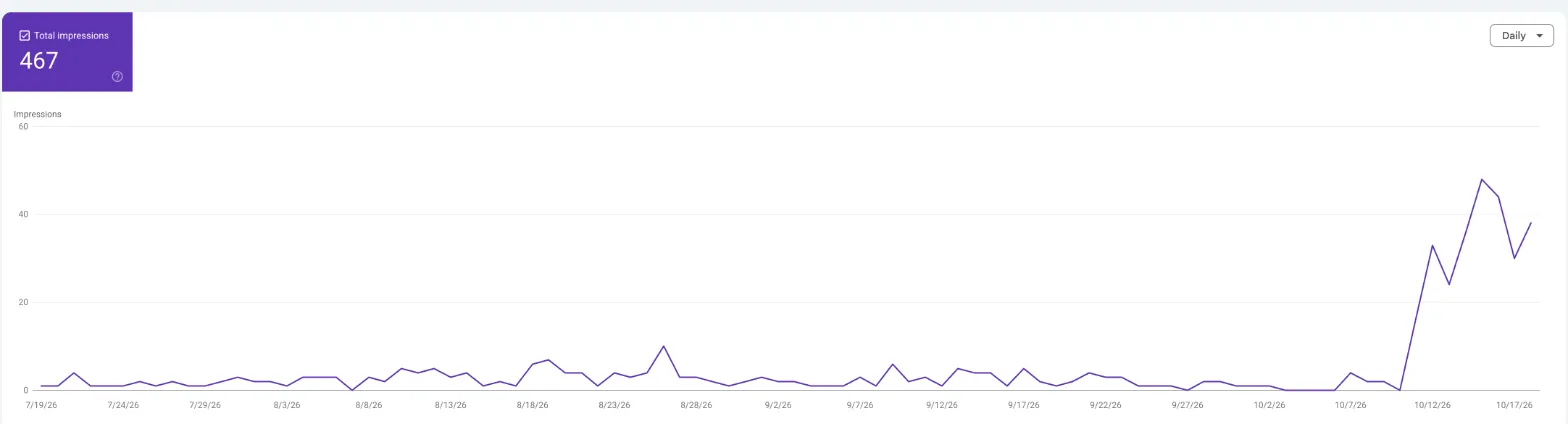
Our Generative AI report in Search Console, read 21 October 2026.
The report doesn’t show which searches, so we fill the gaps another way, which we explain in how to see if AI Overviews cite you.
Questions we get asked
Does Astro need an SEO plugin?
No. Astro has no plugin system like WordPress’s; you build the SEO layer as code, usually one component for titles, descriptions, canonicals and social tags, plus the official sitemap integration. It takes longer to set up than a plugin, but it’s written once and every page inherits it.
Why is Astro better than WordPress for SEO?
It isn’t automatically. Astro makes light, fast pages the default and has no plugins to keep updated, which helps. WordPress has mature SEO plugins and settings your team can change without a developer. Either can rank well: what matters is the setup, the content and the links.
How do I add a sitemap to an Astro site?
Run npx astro add sitemap, then set your site’s full address in astro.config.mjs, because the integration needs it. The sitemap rebuilds with every build. Use its filter option to leave out pages that shouldn’t be crawled, and give last-modified dates only where they’re real.
Can AI crawlers read an Astro site?
Yes, easily. Astro sends the content as plain HTML, so crawlers don’t need to run JavaScript to read it. Check that your robots.txt and firewall don’t block them, and add structured data and an llms.txt file so AI tools get the facts about you right.
If you’re building on Astro, start with how to build a website with Astro, or see our guides to Astro web development. For help with search and AI search on any platform, see our SEO service and AI SEO, or tell us about your site.