
Services
Strategy
We find the clearest path from what your business needs to what your website should do.
What’s included
- Page strategy
- Landing page strategy
- Site architecture
- Content planning
- Wireframes
- Migration planning




Branding
We shape a distinct visual identity that works on screen first and carries through everything you make.
What’s included
- Visual identity
- Brand refresh
- Colour & typography
- Moodboards & direction
- Brand guidelines
- Digital brand systems
Recent work


Design
We turn the plan into a distinct, usable design that feels right for your brand and works across every screen.
What’s included
- Website design
- UI design
- Responsive design
- Design systems
- Visual direction
- Content presentation


Development
We build fast, reliable websites in Webflow or with custom code, with the integrations each project needs.
What’s included
- Webflow development
- Custom website development
- Custom interactions
- Performance engineering
- CRM & email integrations
- Booking & payments


SEO & AI search
We make your site easy for search engines and AI assistants to find, understand and point people to.
What’s included
- Technical SEO
- AI search & AEO
- Structured data
- Answer-ready content
- Core Web Vitals
- AI crawler access
Optimisation
We keep improving what happens after launch, using real behaviour data to turn more visitors into enquiries.
What’s included
- Conversion optimisation
- A/B changes
- Landing pages
- Copy reworks
- Analytics & heatmaps
- Monthly improvements
Recent work


Latest
The newest posts, across every topic.



Design
Planning and designing websites, and the tools we use.



Development
Webflow, Astro, Claude Code, CMS choices and what builds really take.

SEO & AI search
Getting found in Google and quoted by AI assistants.


Studio
How we run projects, from proposals to launch week.



How to see if AI Overviews cite you
Search Console shows which pages appear in AI Overviews, not for which searches. How we track AI Overview citations, with our own numbers and the tools.
- Written by
 Matthew Bishop
- Published
- Reading time
- 8 minutes
Search Console’s Generative AI report shows which of your pages appear in AI Overviews, but not for which searches. To see the searches and whether you’re cited, filter the normal Performance report for question-style searches, then check your target searches live with a SERP API or a rank tracker that records AI Overview sources. Visits from AI assistants in your analytics fill in the rest.
Here’s what that showed on our own site in October 2026, and the kinds of AEO tools that do each part.
What our Search Console showed
From 18 July to 17 October 2026, Search Console counted 429 impressions of superbrick.studio in AI Overviews and AI Mode. 232 of them came in a single week, 11 to 17 October, two days after our journal launched on 9 October.
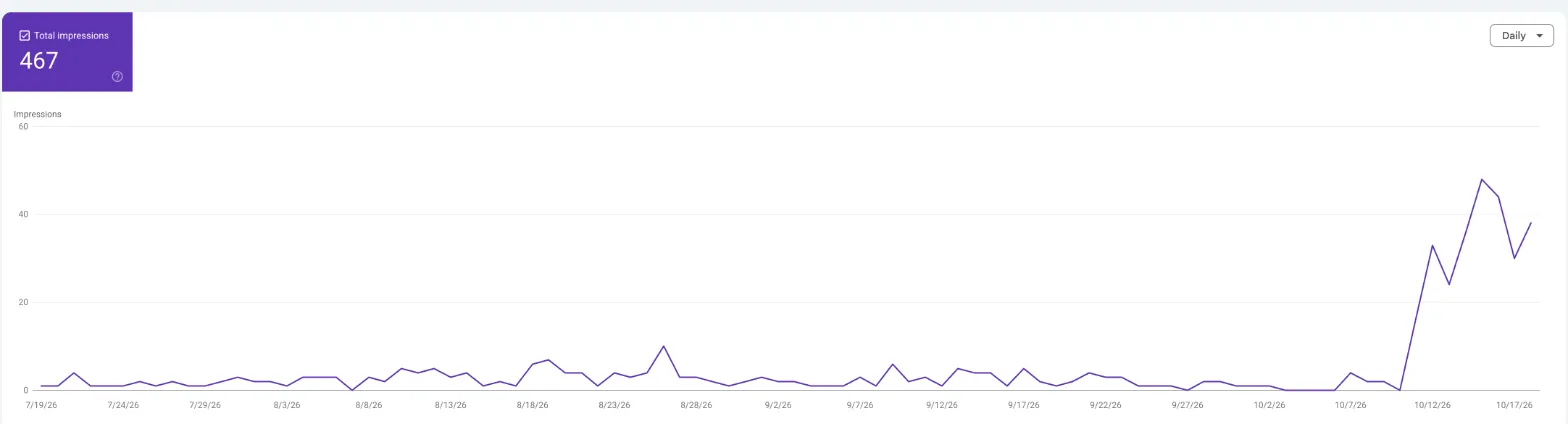
Our Generative AI report in Search Console, read 21 October 2026. It runs to 18 October, one day later than the figures above, so the total reads 467.
In the 28 days to 17 October, the page with the most AI impressions was our Best CMS for Astro post, with 92. The home page had 44, then our posts on designing in Paper. Over the full three months, France and the US had 77 impressions each, Australia 63, the UK 22 and India 20.
The report couldn’t tell us which searches, though, or whether we were a cited source.
What the Generative AI report shows, and what it doesn’t
Google launched the report on 3 June 2026 and had rolled it out to all sites by 31 August 2026 (Google). It sits with the other Performance reports in Search Console.
| It shows | It doesn’t show |
|---|---|
| Impressions in AI Overviews and AI Mode | Clicks |
| Pages | Search terms |
| Countries and devices | Which answer, or where in it, you appeared |
| Dates | Anything for ChatGPT, Perplexity or other assistants |
Google says the same impressions are still counted in the overall Performance report (Google). Its help page lists four breakdowns: pages, countries, dates and devices (Google). We found no API or BigQuery export for it, and other site owners’ tests found the same. Google says it may add more metrics over time.
How to find the searches behind your AI impressions
Because the AI report has no queries, we use the normal Performance report, which does.
-
Open Performance, Search results, and set the same date range as the AI report.
-
Filter to one page that has AI impressions, such as your top post.
-
Add a query filter, Custom (regex), for question-style searches:
^(who|what|which|why|how|is|are|can|does|should|best)\b|\?$ -
Run it again for long, prompt-style searches, eight words or more:
^(\S+\s+){7,}\S+ -
Compare the totals with that page’s AI impressions.
The second filter is where AI tools show up. On our site it surfaced searches like “who builds webflow sites with a component system a marketing team can run without a developer?” and persona-style prompts that begin “i am a marketing manager or chief marketing officer.” They read like searches an assistant makes while it researches an answer. We wrote about this pattern in AEO vs GEO vs SEO.
Expect the numbers not to add up. Search Console hides rare searches, so the listed ones cover only part of the AI impressions. For the Astro post, the filters found about 37 listed impressions against 92 AI impressions in the same period.
How to check whether you’re cited
Search Console can’t say whether a page was cited, so we check our target searches directly.
- List the searches you want to be found for: services, locations and the questions your guides answer.
- Run each one through a SERP API in the country and device that matter. DataForSEO’s Google results include the AI Overview with each source’s domain and URL (DataForSEO).
- Record three things for each search: whether there’s an AI Overview, whether your site is a source, and which sites are.
- Repeat on a schedule. AI Overviews change from one day to the next, so the trend matters more than any single check.
On 20 October 2026 we ran 27 checks this way, on desktop: 21 searches in Australia and six in the US. With AI Overviews loaded, each cost about US$0.004. AI Overviews cited superbrick.studio on four:
- “webflow lighthouse score” in Australia and the US cited our Webflow Lighthouse score post.
- “how to improve lighthouse score webflow” in Australia cited the same post, which also ranks first there.
- Our brand search in the US cited the home page.
The Lighthouse post was cited for “webflow lighthouse score” while not ranking in Google’s top 20 for it. A page doesn’t need to rank on page one to be a source.
Agency searches went differently. For “webflow agency australia” and “webflow agency brisbane”, the AI Overviews cited directories, list posts and agencies’ Google Business Profiles. The Brisbane one named Superbrick, but its source was Webflow’s partner directory, not our site. “web design brisbane” showed no AI Overview at all, only the map pack.
The pattern we saw
- Specific, number-heavy guides get cited. The Lighthouse post is full of scores and steps.
- Agency searches lean on directories and business profiles.
- Broad topic searches lean on big publishers, Reddit and YouTube.
That matches what we found when we wrote pages for AI assistants to quote: clear, sourced facts get you cited, and what others say about you gets you recommended.
Visits from AI assistants
Impressions and citations don’t show whether anyone came to the site. Our analytics, PostHog, records a visit_from_ai event when a visit arrives from ChatGPT, Perplexity, Claude, Gemini or Copilot, going by the referrer. It undercounts, because many AI answers send no referrer, so we treat it as a floor. We keep these numbers in a private weekly dashboard.
The kinds of AEO tools
No single tool covers all of this. The main kinds, with what each vendor says it does:
| Kind | Pages | Searches | Citations | Cost |
|---|---|---|---|---|
| Search Console’s Generative AI report | Yes | No | No | Free |
| Search Console Performance, with regex filters | Yes | Some | No | Free |
| SEO suites with AI Overview tracking | Varies by tool | Your tracked keywords | Yes | Subscription |
| AI visibility trackers | Varies by tool | Your prompts | Yes, across assistants | Subscription |
| A SERP API | Yes | Your list | Yes | Per search |
- SEO suites. Semrush’s Position Tracking can filter tracked keywords to those where your domain appears as an AI Overview source (Semrush). Ahrefs’ Rank Tracker flags AI Overviews among its SERP features, and its Site Explorer and Brand Radar show AI Overview citations and cited pages (Ahrefs, Ahrefs). SE Ranking says it tracks rankings in AI Overviews, AI Mode, ChatGPT and Gemini (SE Ranking).
- AI visibility trackers run a set of prompts across assistants and record mentions and cited sources. Profound lists ChatGPT, Perplexity, Claude, Gemini, Copilot, DeepSeek and AI Overviews (Profound). Peec AI names ChatGPT, Perplexity and Gemini (Peec AI). Otterly.ai lists AI Overviews, AI Mode, ChatGPT, Perplexity, Gemini, Copilot and Claude (Otterly.ai).
- SERP APIs such as DataForSEO suit a do-it-yourself check, like ours, if you’re happy to work with the raw results.
Before any of these, make sure AI crawlers can reach your pages at all. Our robots.txt checker tests that.
Questions we get asked
Does Search Console show AI Overview citations?
Not directly. Its Generative AI report counts impressions in AI Overviews and AI Mode by page, country, device and date. It doesn’t show the searches, clicks, or whether your page was the cited source. For that, check your target searches with a SERP API or a rank tracker that records AI Overview sources.
How do I find which searches trigger my AI impressions?
Use the normal Performance report, filtered to one page, with a custom regex on queries for question-style or long, prompt-style searches. You’ll see examples, not a full list, because Search Console hides rare searches. On our Astro post, the listed searches covered about 37 of 92 AI impressions.
Do I need to rank on page one to be cited?
Not always. Our Lighthouse post was cited in an AI Overview for “webflow lighthouse score” while not ranking in Google’s top 20 for it. Ranking still helps, and the same post was cited where it ranks first.
What are the best AEO tools?
It depends on what you need to see. Search Console is free and shows which pages appear. SEO suites add AI Overview tracking to rank tracking. AI visibility trackers run prompts across several assistants. A SERP API is the cheapest way to check specific searches yourself.
Why don’t visits from AI assistants match AI impressions?
Impressions count how often your page was shown in an AI answer, not visits. And many AI answers send no referrer, so analytics records those visits as direct traffic. Counts of AI visits are a floor, not a total.
To see how AI assistants answer your buyers’ questions today, try our free AI visibility checker. If you’d like your site set up and measured for AI search, see our SEO, AEO and AI search service, or tell us about your site.
Sources
- Google Search Central, Introducing Search Generative AI performance reports in Search Console (3 June 2026), read 21 October 2026
- Google Search Console Help, Generative AI performance report, read 21 October 2026
- DataForSEO, Google Organic SERP advanced results, read 21 October 2026
- Semrush, SERP Features: AI Overview, read 21 October 2026
- Ahrefs, Rank Tracker and How to track AI Overviews, read 21 October 2026
- SE Ranking, Rank Tracker, read 21 October 2026
- Profound, Peec AI and Otterly.ai, read 21 October 2026
- Superbrick’s Search Console, DataForSEO checks and PostHog data, 18 July to 20 October 2026