
Services
Strategy
We find the clearest path from what your business needs to what your website should do.
What’s included
- Page strategy
- Landing page strategy
- Site architecture
- Content planning
- Wireframes
- Migration planning




Branding
We shape a distinct visual identity that works on screen first and carries through everything you make.
What’s included
- Visual identity
- Brand refresh
- Colour & typography
- Moodboards & direction
- Brand guidelines
- Digital brand systems
Recent work


Design
We turn the plan into a distinct, usable design that feels right for your brand and works across every screen.
What’s included
- Website design
- UI design
- Responsive design
- Design systems
- Visual direction
- Content presentation


Development
We build fast, reliable websites in Webflow or with custom code, with the integrations each project needs.
What’s included
- Webflow development
- Custom website development
- Custom interactions
- Performance engineering
- CRM & email integrations
- Booking & payments


SEO & AI search
We make your site easy for search engines and AI assistants to find, understand and point people to.
What’s included
- Technical SEO
- AI search & AEO
- Structured data
- Answer-ready content
- Core Web Vitals
- AI crawler access
Optimisation
We keep improving what happens after launch, using real behaviour data to turn more visitors into enquiries.
What’s included
- Conversion optimisation
- A/B changes
- Landing pages
- Copy reworks
- Analytics & heatmaps
- Monthly improvements
Recent work
Latest
The newest posts, across every topic.



Design
Planning and designing websites, and the tools we use.



Development
Webflow, Astro, Claude Code, CMS choices and what builds really take.
SEO & AI search
Getting found in Google and quoted by AI assistants.



Studio
How we run projects, from proposals to launch week.



HubSpot CMS vs Webflow for B2B marketing sites
HubSpot CMS or Webflow for a B2B marketing site? HubSpot keeps site and CRM in one place; Webflow leads on design and page building. Costs and when to switch.
- Written by
 Matthew Bishop
- Published
- Reading time
- 5 minutes
If your marketing already runs on HubSpot, both are sensible homes for the website, and the choice comes down to what matters more. HubSpot’s CMS, now called Content Hub, keeps the site inside the CRM: forms, personalisation by contact data, gated content and reporting all in one place. Webflow gives designers and marketers more freedom to build pages, with a component system your team assembles new pages from, while HubSpot stays as the CRM behind it. It’s a common setup, and the one most of our clients use: Webflow for the site, HubSpot for everything else.
We moved Fresh Clinics from HubSpot’s CMS to Webflow, keeping HubSpot as its CRM, and we connect HubSpot to most of the Webflow sites we build. Here’s how the two compare.
How they compare
Prices are in US dollars, from HubSpot’s and Webflow’s pricing pages on 5 November 2026.
| HubSpot Content Hub | Webflow, with HubSpot as the CRM | |
|---|---|---|
| Building pages | Drag-and-drop editor on HubSpot themes and modules | Visual editor with full design control, from the site’s own components |
| Forms | HubSpot forms, native | HubSpot forms placed with Webflow’s HubSpot app, or Webflow forms mapped to HubSpot |
| Personalisation and A/B tests | Smart content and A/B testing on Professional and Enterprise | Webflow Optimize add-on, from US$299 a month |
| Approvals before publishing | Content approvals on Enterprise | Publishing workflows on Team and Enterprise plans |
| Gated content and memberships | Memberships built in | Built with HubSpot forms and gated pages |
| Plan cost | Professional from US$450 a month with 3 seats; Enterprise from US$1,500 | US$25 a month billed yearly for the Premium site plan, plus your HubSpot plan |
From hubspot.com/pricing/content, HubSpot’s approvals guide and webflow.com/pricing. Webflow’s Team plan, with publishing workflows and the site activity log, is US$2,500 a month on an annual contract.
Where HubSpot’s CMS is strong
- One system. The site, forms, contacts, emails and reports live in the same place, so there’s nothing to connect and nothing to keep in sync.
- Personalisation from the CRM. On Professional and Enterprise, smart content changes what a page shows based on what HubSpot knows about the visitor, such as their lifecycle stage or country.
- Reporting from first visit to deal. Page views, form submissions and deals sit in one database, so attribution is simpler.
- Gated content and memberships are part of the platform rather than something to build.
If your marketing team lives in HubSpot, builds pages rarely, and gets real value from personalisation, staying on HubSpot’s CMS is a reasonable choice.
Where Webflow is strong
- Design and page building. Pages are built from the site’s own components, so marketers can put new landing pages together without a developer, and the design isn’t limited to what a theme allows (how that works).
- Governance as the team grows. Roles and permissions for each person, and on Team and Enterprise Platform plans, page branches with review before publishing and a site activity log.
- Speed and SEO control. Webflow publishes clean, fast pages, and puts titles, descriptions, redirects and schema in the marketing team’s hands (our Webflow SEO guide).
- HubSpot still works. HubSpot forms, the tracking code and CRM data all carry on, connected through Webflow’s HubSpot app (how to connect them).
Why Fresh Clinics moved
Fresh Clinics’ old site was built in HubSpot’s CMS and had grown hard to change: it lacked flexible templates, and every new landing page was a job. With an event one week and a campaign the next, the marketing team needed to move faster.
We rebuilt it in Webflow for Australia and the US, and kept HubSpot at the centre:
- HubSpot forms on every page, sending enquiries straight into the CRM, with gated resources on their own preview, form and download pages.
- Events created once in HubSpot, then synced into the site’s event calendar twice a day.
- More than 150 articles moved from HubSpot’s CMS to Webflow’s, with 324 redirects so every old address lands on its new home.
- Pages the team builds. After training, Fresh’s designer builds new landing pages from the site’s components herself.
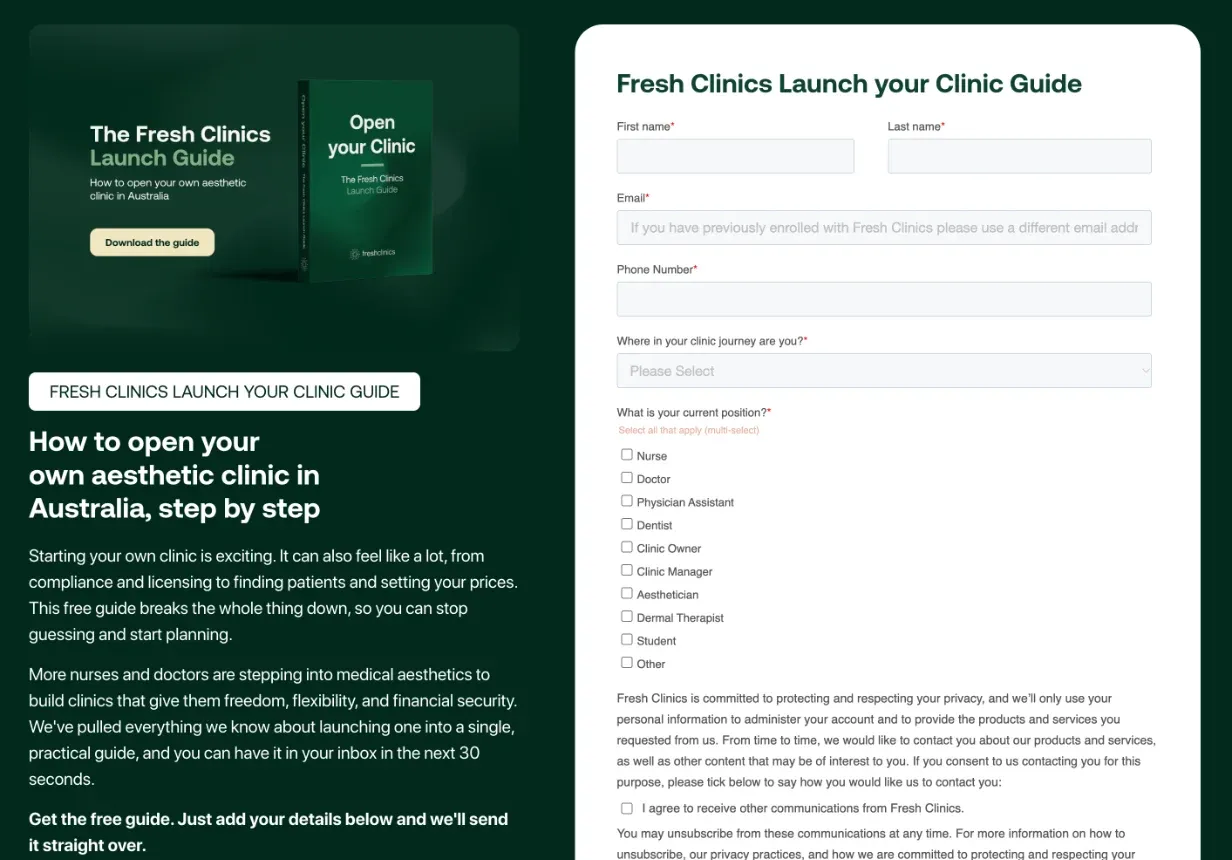
A gated guide on Fresh Clinics’ Webflow site, with a HubSpot form sending each download into the CRM.
Which suits your team
- How often do you build new pages? Weekly campaign and event pages favour Webflow’s components. A site that changes rarely is easy to keep in HubSpot.
- How much do you personalise by CRM data? If smart content drives results, HubSpot’s CMS does it natively; in Webflow it’s an add-on.
- Who designs the site? If the brand needs more than a theme allows, Webflow gives designers full control.
- What’s your HubSpot tier? If you only pay for Content Hub to host the site, moving the site can lower that bill. If you use Professional features across marketing, the saving is smaller.
Questions we get asked
Can we keep HubSpot if we move the website to Webflow?
Yes, and most of our clients do. HubSpot stays as the CRM: forms go into HubSpot, the tracking code runs across the Webflow site, and emails, workflows and reporting carry on as before. Only the website moves.
Is Webflow or HubSpot CMS better for SEO?
Both can do what search engines need: fast pages, editable titles and descriptions, sitemaps, redirects and structured data. Webflow gives more control over page structure and speed; HubSpot ties content to its SEO and reporting tools. How well the site is set up matters more.
Will we lose traffic moving from HubSpot CMS to Webflow?
Not if the move is planned: every article and page moved, every changed URL redirected, and the titles and content kept. For Fresh Clinics we moved more than 150 articles with 324 redirects. Our website migration SEO guide covers the steps.
Can Webflow do HubSpot’s smart content?
Partly. Webflow Optimize, an add-on from US$299 a month, offers A/B testing and personalisation by audience. If personalising pages from HubSpot contact data is central to your marketing, check how Optimize would do it before you move.
How long does a move from HubSpot CMS to Webflow take?
We plan builds for two and a half to three months. When one runs longer, it’s usually waiting on copy. Moving the blog and resources adds time with the size of the library, so count your articles before you plan.
If you’re weighing up a move, see our website migration service, or tell us about your site.