
Services
Strategy
We find the clearest path from what your business needs to what your website should do.
What’s included
- Page strategy
- Landing page strategy
- Site architecture
- Content planning
- Wireframes
- Migration planning




Branding
We shape a distinct visual identity that works on screen first and carries through everything you make.
What’s included
- Visual identity
- Brand refresh
- Colour & typography
- Moodboards & direction
- Brand guidelines
- Digital brand systems
Recent work


Design
We turn the plan into a distinct, usable design that feels right for your brand and works across every screen.
What’s included
- Website design
- UI design
- Responsive design
- Design systems
- Visual direction
- Content presentation


Development
We build fast, reliable websites in Webflow or with custom code, with the integrations each project needs.
What’s included
- Webflow development
- Custom website development
- Custom interactions
- Performance engineering
- CRM & email integrations
- Booking & payments


SEO & AI search
We make your site easy for search engines and AI assistants to find, understand and point people to.
What’s included
- Technical SEO
- AI search & AEO
- Structured data
- Answer-ready content
- Core Web Vitals
- AI crawler access
Optimisation
We keep improving what happens after launch, using real behaviour data to turn more visitors into enquiries.
What’s included
- Conversion optimisation
- A/B changes
- Landing pages
- Copy reworks
- Analytics & heatmaps
- Monthly improvements
Recent work
Latest
The newest posts, across every topic.



Design
Planning and designing websites, and the tools we use.

Development
Webflow, Astro, Claude Code, CMS choices and what builds really take.


SEO & AI search
Getting found in Google and quoted by AI assistants.



Studio
How we run projects, from proposals to launch week.



Can marketers use Webflow without developers?
Can marketers use Webflow without developers? Mostly yes: what a marketing team can build and publish on its own, what stays locked, and what needs one.
- Written by
 Matthew Bishop
- Published
- Reading time
- 8 minutes
A marketing team can build and publish most of its own Webflow pages when the site is made from approved sections: pick the sections, fill in the copy and images, check the page on staging, then publish. The design stays locked, and new sections, integrations and custom features still need a developer.
What stays locked is how each section looks, the styles behind it, and the site-wide code and settings. That split is how we set up the sites we build for marketing teams. Below is how a page comes together, where the limits sit, and how it works at five of our clients.
How a page gets built
At Altus, a new page is built like this:
- Start from a template. The team creates the page from a basic page template, with the navigation and footer already in place and an open space between them for sections. In Webflow, pages made from a template inherit its settings, such as SEO settings and custom code (Webflow).
- Add sections. Pre-built sections go into that space: headers with text and an image, two-column features, stats, cards, forms, calls to action, FAQs and pricing. Some come in colour variants, such as a white or a purple call to action.
- Fill them in. Text, images, links and whatever options each section offers.
- Set the page details. Address, page title, description and social image.
- Keep it as a draft, review on staging, then publish.
Webflow calls that open space a page slot: a placeholder where marketers can add components that already exist on the site. A page without one can only be edited, not built on (Webflow). Designers can also limit which components a slot inside a component will accept (Webflow).
What’s editable and what’s locked
In Webflow, what each person can do depends on their site role. Here are the three roles that matter most, from Webflow’s own permissions table (Webflow):
| Marketer | Content editor | Designer | |
|---|---|---|---|
| Build new pages from existing components | Yes | No | Yes |
| Edit text, images, links and component options | Yes | Yes | Yes |
| Create, update and publish CMS items | Yes | Yes | Yes |
| Edit page titles and descriptions | Yes | Yes | Yes |
| Create components, or change existing ones | No | No | Yes |
| Create or change styles and variables | No | No | Yes |
| Site-wide custom code and apps | No | No | Yes |
Publishing is a separate switch. On Growth and Agency Workspace plans, a Can publish setting decides whether each person can publish the site, and someone without it can still publish individual CMS items.
If your team used Webflow’s old Editor, it has gone. As of 5 October 2026 the legacy Editor is fully deprecated, and editors need a seat with a role. People moved across automatically were given Content editor (Webflow), which edits existing pages but can’t build new ones. If your team should be building pages, ask for Marketer.
The locks are the point. They let someone build a page in a hurry that still looks like the rest of the site. The same idea works outside Webflow: Generate’s site is code, with editing rules that set out which components to use and what never to touch. The team asks an AI assistant for a change, and checks it on a preview link before it goes live (Generate case study). We compare the two approaches in Webflow vs WordPress for B2B marketing teams.
Review on staging, then publish
Every Webflow site comes with a staging address (yoursite.webflow.io), and you can publish there without touching your live domain (Webflow). Altus’s team publishes to staging first and checks the page there, including German pages before they go live.
A few details decide how safe publishing feels:
- Drafts stay drafts. CMS items in draft aren’t published with the site. Each item can be published now, queued for the next site publish, or scheduled (Webflow).
- A full publish sends everything. Publishing the site makes all finished changes live at once, including other people’s. On Team and Enterprise Platform plans you can publish a single page instead; redirects and other site settings still need a full publish (Webflow).
- Branches add a review step. On the same plans, marketers can build a page on a branch and request review, but only a designer can merge it (Webflow). Enterprise sites can add a publishing workflow that summarises every change before it reaches production (Webflow).
What still needs a developer
These still come back to us:
- New sections. When a page needs something the library doesn’t have, a designer or developer builds it once and it joins the library. At Altus’s training, the plan was for Nick to flag the sections he needed as he started building pages, and for us to build them. We recommend leaving component building to us so the design system stays intact.
- Custom features. Altus’s pricing calculator runs on our own code inside the Webflow page, while the marketing team edits the plans and wording around it.
- Integrations. Fresh Clinics creates its events in HubSpot, and a sync we built brings them into the site twice a day.
- Site-wide changes. Styles, variables, custom code and apps are Designer-level permissions in Webflow.
Some things look technical but aren’t. Altus’s forms are HubSpot embeds, so Nick builds and updates them in HubSpot without us.
AI is moving that line. After handover, Will at New Word Order built a CMS collection, an insights hub and an article template on staging himself, using Claude connected to Webflow and trained on the notes from our handover meetings, and he made sure it built from the site’s existing pages and components. Then he asked us for two things: a review of how the pages handled styles and classes, and version control, because AI can “royally mess things up very quickly”. That’s a good split. Teams can now build more than ever on their own; what they need from a developer is the structure that keeps it safe.
What it looks like for our clients
- Endeavour Lotteries. A new campaign is always on the way, so we rebuilt the component library into about 20 clearly named components, moved the FAQs into the CMS so one answer updates every page, and trained the marketing team in Webflow. We meet every week, build the pages that need something new, and the team builds the rest.
- Altus. In August 2026, a month after launch, we trained the team in a working session: marketer mode, staging, the CMS, building pages from components, HubSpot forms, SEO fields and redirects. The team now builds pages and publishes posts in English and German.
- Fresh Clinics. After a series of working sessions and training, Fresh’s designer builds pages herself. We build the bigger pieces: new sections, integrations and pages for new markets.
- Smokeball. Three regional sites share one library of 248 components. After launch we ran a handover session on building pages from it. The goal was a system their team could build new landing pages with in under half an hour.
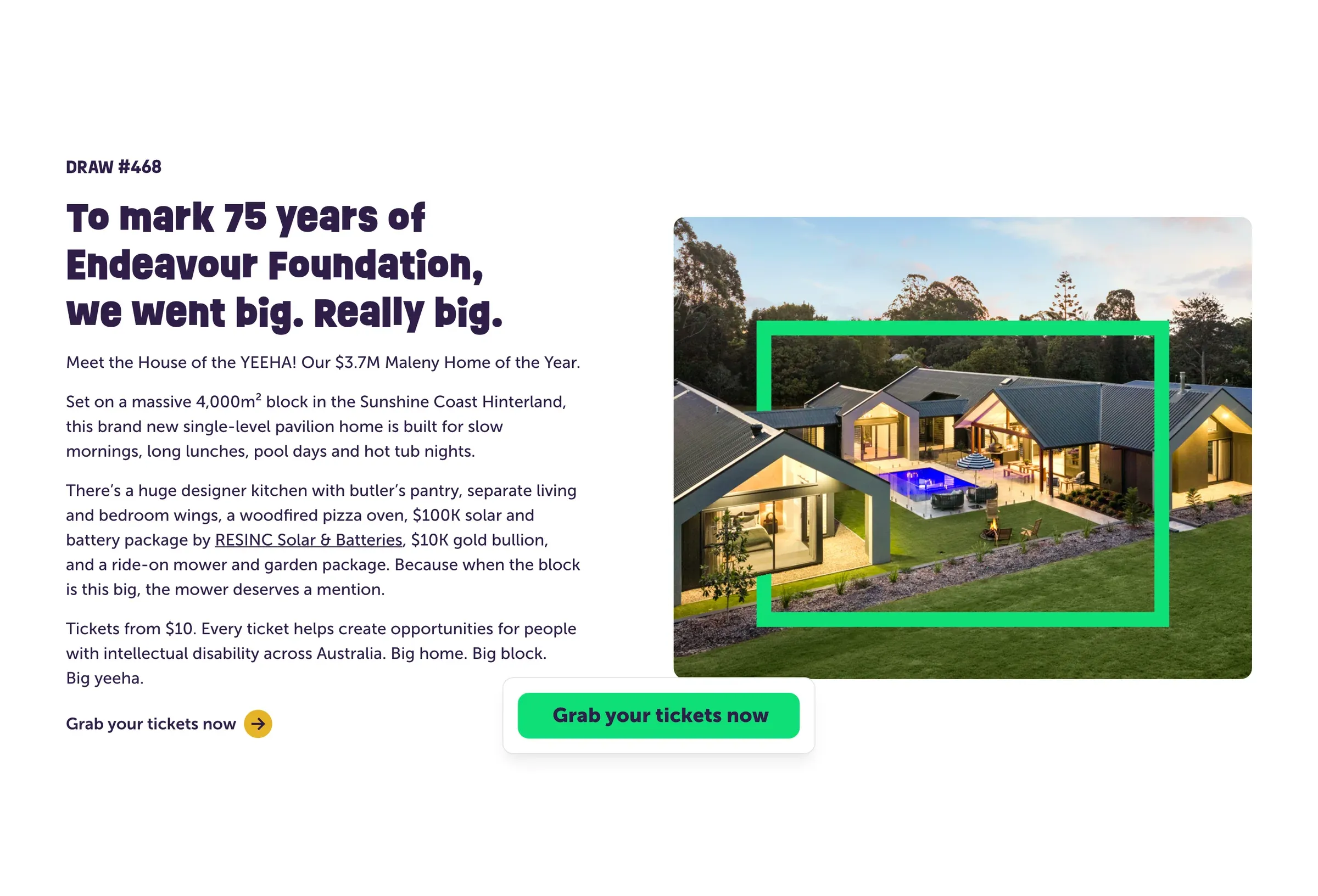
An Endeavour Lotteries draw page: new photos and copy on components every draw page shares.
“Not only has Matt helped us make improvements to our website in Webflow, but he’s also empowered our team with the knowledge and tools to manage and make changes ourselves… I would highly recommend Matt and the Superbrick team!”
Lydia Jeffery, Loyalty Marketing Specialist, Endeavour Lotteries
Questions we get asked
Can our marketing team build pages in Webflow without a developer?
Yes, if the site is built from components and the team has the Marketer role. Marketers can build pages from existing components, edit content, manage the CMS and, with Can publish switched on, publish. New components, styles and custom code still need a designer or developer.
What’s the difference between Webflow’s Marketer and Content editor roles?
A Marketer can build new pages from the site’s components; a Content editor can only edit existing pages and CMS items. Both can change text, images, links and page titles. People moved from the old Editor were given Content editor, so check who needs to build pages.
Can we stop someone publishing by mistake?
Yes. On Growth and Agency Workspace plans, turn Can publish off for that person; they can still publish individual CMS items. On Team and Enterprise Platform plans, marketers can work on a page branch and request review before a designer merges it.
How many components does a site need?
Enough to cover the pages you make often, and no more. Endeavour’s campaign pages are built from about 20 named components; Smokeball’s three regional sites share 248. Start with the sections you use most, and add more as the team finds gaps.
How do I edit my Webflow website?
Open the site in Webflow. Depending on your role, you can change text, images and links on existing pages, edit CMS items such as blog posts, or build new pages from the site’s components. Check your changes on staging, then publish.
Can I edit my website after I publish it?
Yes. In Webflow you keep editing the same site and publish again when you’re ready, and CMS items can be published one at a time. Nothing you change goes live until it’s published.
If you want a site your team can publish on, and a clear line for what comes back to us, see how we build sites or tell us how your team works.
This guide is part of Webflow for marketing teams, which brings together everything we’ve written on choosing, building and running a Webflow site.
Sources
- Webflow, Page building, read 9 October 2026
- Webflow, Slots, read 9 October 2026
- Webflow, Site roles and permissions, read 9 October 2026
- Webflow, Legacy Editor deprecation FAQ, read 9 October 2026
- Webflow, How do I publish or unpublish a Webflow site?, read 9 October 2026
- Webflow, Save and publish Collection items, read 9 October 2026
- Webflow, Publish a single page, read 9 October 2026
- Webflow, Page branching, read 9 October 2026
- Webflow, Publishing workflow, read 9 October 2026