
Services
Strategy
We find the clearest path from what your business needs to what your website should do.
What’s included
- Page strategy
- Landing page strategy
- Site architecture
- Content planning
- Wireframes
- Migration planning




Branding
We shape a distinct visual identity that works on screen first and carries through everything you make.
What’s included
- Visual identity
- Brand refresh
- Colour & typography
- Moodboards & direction
- Brand guidelines
- Digital brand systems
Recent work


Design
We turn the plan into a distinct, usable design that feels right for your brand and works across every screen.
What’s included
- Website design
- UI design
- Responsive design
- Design systems
- Visual direction
- Content presentation


Development
We build fast, reliable websites in Webflow or with custom code, with the integrations each project needs.
What’s included
- Webflow development
- Custom website development
- Custom interactions
- Performance engineering
- CRM & email integrations
- Booking & payments


SEO & AI search
We make your site easy for search engines and AI assistants to find, understand and point people to.
What’s included
- Technical SEO
- AI search & AEO
- Structured data
- Answer-ready content
- Core Web Vitals
- AI crawler access
Optimisation
We keep improving what happens after launch, using real behaviour data to turn more visitors into enquiries.
What’s included
- Conversion optimisation
- A/B changes
- Landing pages
- Copy reworks
- Analytics & heatmaps
- Monthly improvements
Recent work
Latest
The newest posts, across every topic.



Design
Planning and designing websites, and the tools we use.

Development
Webflow, Astro, Claude Code, CMS choices and what builds really take.


SEO & AI search
Getting found in Google and quoted by AI assistants.



Studio
How we run projects, from proposals to launch week.



Webflow vs WordPress for B2B marketing teams
For most B2B marketing teams, Webflow is the better fit. When WordPress is still the right call, what each costs, and when custom code beats both.
- Written by
 Matthew Bishop
- Published
- Reading time
- 9 minutes
For most B2B marketing teams, Webflow is the better fit: the team can build and publish pages themselves, and hosting, security and updates are handled for them. WordPress is the better choice when you need its plugin ecosystem or already have WordPress developers on hand. And if you want full control and the lowest running costs, a custom-coded site is a third option worth weighing.
The short answer
Choose Webflow if your marketing team wants to build and publish pages without waiting on a developer, and would rather not look after hosting, security or updates. That describes most of the B2B teams we work with.
Choose WordPress if the site depends on plugins nothing else replaces, or you already have WordPress developers who look after it well. It runs 40.1% of all websites, against Webflow’s 0.8% (W3Techs, October 2026), so its ecosystem is enormous.
Consider custom code if you want full control and low running costs, and your team is comfortable checking changes on a preview rather than dragging blocks around a visual editor.
How they compare
Prices are in US dollars before tax, from the official pricing pages on 9 October 2026.
| WordPress | Webflow | Custom code | |
|---|---|---|---|
| Who edits pages | Your team, in the block editor or a page builder; how it feels depends on the theme and plugins | Your team, in a visual editor, building pages from the site’s own components | Your team, through a connected CMS, or by asking an AI assistant for changes they check on a preview |
| Upkeep | WordPress, its themes and its plugins all need updating | Hosting, security and platform updates handled by Webflow | The developer keeps the code’s dependencies up to date |
| Integrations | Plugins for almost anything, each one more to maintain | Native integrations, apps and embeds, with custom code where Webflow runs out | Anything that can be built, at the cost of building it |
| More than one language | A multilingual plugin | Webflow Localize, an add-on from US$9 a month | Built into the site |
| Hosting | Any host you choose | Included in the site plan | A platform such as Vercel, US$20 a month on its Pro plan |
| Platform cost | Free software; you pay for hosting, premium themes and plugins, and upkeep | From US$15 a month billed yearly, or US$25 with the CMS | Hosting only, but every feature is custom work |
| Best fit | Teams with WordPress developers, or needs only its plugins cover | Marketing teams who want to publish without a developer | Teams who want full control and are comfortable with a code-based workflow |
Why marketing teams leave WordPress
When marketing teams come to us wanting off WordPress, the reasons are remarkably consistent:
- It’s clunky to edit, especially once a page builder is layered on top.
- The plugins never stop. Somebody has to keep WordPress, the theme and every plugin up to date. WordPress’s own security guide is blunt about it: “make sure your plugins are always updated”, and delete the ones you don’t use (WordPress).
- Security is a standing risk. Every third-party plugin is code from someone you may not be able to vouch for, and WordPress lists outdated plugins among the most common targets for attacks (WordPress).
- Plugins add weight. Each one brings its own code, so a site built from many of them gets bloated and slow.
- Pages look templated. Themes and page builders make it easy to end up looking like everyone else.
Each problem is manageable on its own. Together they make WordPress inefficient for a marketing team: the team either waits on a developer or learns to work around the site, and the site slowly stops keeping up with the business. If you want to grow a marketing site and do it well, Webflow does that job better.
Altus was a good example. Its WordPress site was put up in 2023 as a temporary fix, locked into a restrictive template. Plugins needed managing, security was a standing worry, small changes needed an outside agency, and there was no way to add other languages. As Altus moved towards marketing-led growth, its marketing team needed a site it could run itself.
When WordPress is the better choice
WordPress is a good platform, and for some teams it’s the right one:
- You run a big publication. WordPress was built for publishing at volume, and large editorial teams with established workflows often suit it best.
- You need a plugin nothing else replaces. Membership, course or complex shop features are often easier to add on WordPress, through plugins built for exactly that.
- You have WordPress people. If a developer already maintains the site well and your team is happy editing it, moving platforms solves a problem you don’t have.
- You want to own the whole stack. WordPress is open source, under the GPL, and runs on any host you choose (WordPress).
If none of these apply and the site is mainly a marketing site (pages, campaigns, a blog, case studies, forms), the upkeep is usually cost without benefit.
When Webflow is the better choice
Webflow suits teams who want the marketing site in marketing’s hands:
- Pages from components. The site is built from reusable sections, so the team assembles new pages rather than asking for them, without breaking the design.
- Nothing to update. Hosting, security and platform updates come with the site plan.
- A real CMS. Blogs, case studies, integrations and resources live in collections the team edits directly.
- Languages when you need them. Webflow Localize adds translated pages and addresses to the same site.
Where Webflow runs out, custom code can sit inside a Webflow page. Altus’s pricing calculator needed more than Webflow’s built-in tabs could do, so it runs on our own code, while the plans and wording around it are still edited in Webflow by the marketing team.
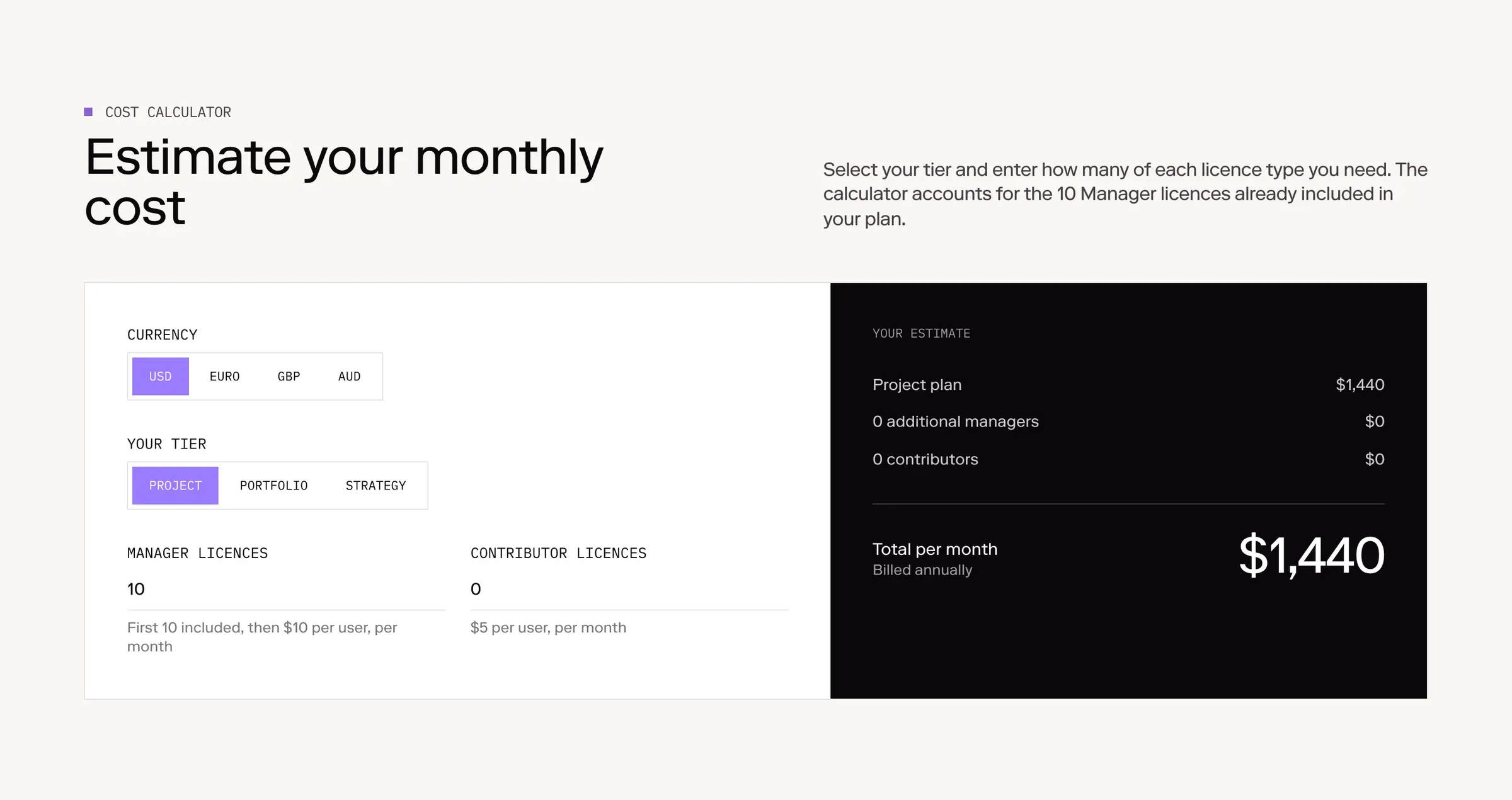
Altus’s pricing calculator: custom code inside a Webflow page.
What the move looked like for Altus
Altus moved from WordPress to Webflow in 18 weeks, from kickoff in March 2026 to launch on 8 July.
- The content didn’t come across cleanly. The WordPress exports proved unreliable, so the blog, case studies and integrations were moved across by hand. Page-builder content rarely exports neatly.
- Every old address was redirected, so existing links kept working. Rankings can still move after any migration, so watch Search Console in the weeks after launch.
- The team was trained before handover, in a working session covering editing, staging changes, the CMS, building pages from components, HubSpot forms, SEO fields and redirects.
- German came later. A week after launch Altus asked for German. It went live in September 2026 on the same site, with more than 100 German pages.
Today Altus’s team builds new pages from the site’s components and publishes blog posts and case studies in English and German on its own, with its forms managed in HubSpot. What it comes back to us for is the work that should need a developer: new components, and technical features like the calculator. The full story is in the Altus case study, and the steps are in our WordPress to Webflow migration plan.
The third option: custom code
There’s a newer route that suits some teams better than either platform: a site built as code, with an AI assistant doing the editing.
Generate’s 2026 site works this way. It’s built with Astro on Vercel, and the team changes it by asking an AI assistant, which makes the change on a separate preview copy of the site. They check it there before it goes live. See the Generate case study.
The trade-offs are real:
- For it: full control over design and performance, no platform plan, and no plugins to keep updated.
- Against it: everything beyond the basics is custom work, there’s no visual editor, and the workflow has to be set up well at the start.
It suits teams that change their site often and are comfortable reviewing a preview link instead of editing on the page. We compare the two code options in Webflow vs Astro and Webflow vs Next.js.
What it costs
The platform is the smaller part of the cost: the comparison table above has the plan prices, as of 9 October 2026. The bigger costs are the build, any content migration and the support after launch, which depend on the site rather than the platform. Our guide to scoping and budgeting a website breaks those down, with nine of our projects side by side.
How to decide
Ask three questions:
- Who will change the site each week? If it’s the marketing team, lean to Webflow or a well-set-up custom build.
- What does the site depend on? If it’s a plugin with no equivalent, stay on WordPress.
- Who looks after it? If nobody wants to own updates, don’t choose a platform that needs them.
Questions we get asked
Is Webflow better than WordPress?
For most B2B marketing teams, yes. Webflow lets the team build and publish pages without a developer and handles hosting, security and updates. WordPress is better when you rely on plugins Webflow can’t replace, or already have WordPress developers looking after the site.
Is WordPress cheaper than Webflow?
The WordPress software is free, while a Webflow site plan starts at US$15 a month billed yearly. But a WordPress site still needs hosting, often premium plugins, and someone to keep it updated, so the running cost depends on the site rather than the licence.
Do we still need a developer with Webflow?
For everyday work, no. Altus’s team builds pages and publishes posts in English and German on its own. A developer is still useful for new components, custom features such as a pricing calculator, and integrations.
When is custom code better than Webflow or WordPress?
When you want full control over the site and its running costs, and your team is comfortable working through previews rather than a visual editor.
Is WordPress outdated in 2026?
No. WordPress still powers a huge share of the web and suits big publishers and teams with WordPress developers. For a marketing team that wants to publish its own pages without keeping plugins updated, Webflow is usually the better fit.
Is Webflow free or paid?
Both. Webflow’s free Starter plan lets you build and test a site on a webflow.io address. To publish on your own domain you need a paid site plan: as of October 2026, from US$15 a month billed yearly, or US$25 with the CMS.
If you’re still unsure, tell us how your team works. We’ll recommend one after the first call, and tell you if staying where you are is the right answer.
This guide is part of Webflow for marketing teams, which brings together everything we’ve written on choosing, building and running a Webflow site.
Sources
- Webflow, Plans & pricing, read 9 October 2026
- WordPress, Hardening WordPress
- WordPress, About
- W3Techs, Usage of content management systems, 9 October 2026
- Vercel, Pricing, read 9 October 2026