
Services
Strategy
We find the clearest path from what your business needs to what your website should do.
What’s included
- Page strategy
- Landing page strategy
- Site architecture
- Content planning
- Wireframes
- Migration planning




Branding
We shape a distinct visual identity that works on screen first and carries through everything you make.
What’s included
- Visual identity
- Brand refresh
- Colour & typography
- Moodboards & direction
- Brand guidelines
- Digital brand systems
Recent work


Design
We turn the plan into a distinct, usable design that feels right for your brand and works across every screen.
What’s included
- Website design
- UI design
- Responsive design
- Design systems
- Visual direction
- Content presentation


Development
We build fast, reliable websites in Webflow or with custom code, with the integrations each project needs.
What’s included
- Webflow development
- Custom website development
- Custom interactions
- Performance engineering
- CRM & email integrations
- Booking & payments


SEO & AI search
We make your site easy for search engines and AI assistants to find, understand and point people to.
What’s included
- Technical SEO
- AI search & AEO
- Structured data
- Answer-ready content
- Core Web Vitals
- AI crawler access
Optimisation
We keep improving what happens after launch, using real behaviour data to turn more visitors into enquiries.
What’s included
- Conversion optimisation
- A/B changes
- Landing pages
- Copy reworks
- Analytics & heatmaps
- Monthly improvements
Recent work
Latest
The newest posts, across every topic.



Design
Planning and designing websites, and the tools we use.



Development
Webflow, Astro, Claude Code, CMS choices and what builds really take.
SEO & AI search
Getting found in Google and quoted by AI assistants.



Studio
How we run projects, from proposals to launch week.



Framer vs Webflow for marketing teams
Framer vs Webflow compared: design, CMS limits, editing, SEO, localisation and price, read from both platforms on 17 October 2026, and which suits your team.
- Written by
 Matthew Bishop
- Published
- Updated
- Reading time
- 7 minutes
Choose Framer for a design-led site with a modest amount of content, built and run by designers who want to move fast. Choose Webflow when a marketing team will run the site long-term, with a larger CMS, several editors, translations and more control over structure and SEO. Both are visual website builders with hosting included; the difference is how far each scales with a team and its content.
We build on Webflow, as a Webflow Premium Partner, and we haven’t built a client site in Framer. So this comparison comes from each platform’s own pricing and documentation, read on 17 October 2026, and from what we see marketing teams need from a site once it’s live. Set against Framer’s published limits, our larger client sites would need its add-ons: Smokeball’s US site has 13 CMS collections, three more than Framer’s Pro plan includes.
Framer vs Webflow at a glance
Prices are in US dollars a month, billed yearly, from each platform’s pricing page on 17 October 2026.
| Framer | Webflow | |
|---|---|---|
| Built for | Designers building fast, polished sites | Teams running a marketing site and its content |
| Entry plan with a custom domain | Basic, US$10: 30 pages, 2 CMS collections, 1,000 items | Basic, US$15: 300 static pages, no CMS |
| Main CMS plan | Pro, US$30: 150 pages, 10 collections, 2,500 items | Premium, US$25: 300 static pages, 40 collections, 20,000 items |
| Growing beyond that | Pro add-ons up to 700 pages, 40 collections and 40,000 items | Team and Enterprise plans |
| Redirects and staging | Pro plan and up | Redirects on paid plans; every site has a webflow.io staging address |
| Translations | Add-on, US$20 per locale | Localize add-on, from US$9 a month |
| Editors | Extra editors US$20 each; content editors US$10 | Workspace seats: full US$39 each, limited (content and page building) US$15 each, reviewers free |
From framer.com/pricing and webflow.com/pricing. Framer shows prices in your local currency; the US dollar figures are what it showed by default. Webflow simplified its plans in May 2026 ([Webflow](https://help.webflow.com/hc/en-us/articles/51059955082387-Updated-pricing-and-simplified-plans-for-May-2026)). Webflow’s seat prices are per month, billed yearly, read 20 October 2026; one full seat is included for the Workspace owner.
Our client sites against Framer’s limits
Framer’s Pro plan includes 150 pages, 10 CMS collections and 2,500 CMS items, with add-ons for more. Here’s how three of our Webflow builds compare, using the figures from their case studies.
| Site | What it holds | On Framer Pro |
|---|---|---|
| Smokeball, US site | 1,182 CMS items in 13 collections | Items fit within 2,500; 13 collections need the collections add-on, US$40 per 10 collections |
| Altus | English and German on one site, with more than 100 German pages | German as a translation locale, US$20 per locale |
| Fresh Clinics | 150+ articles and 90+ FAQs | Fits within 2,500 items |
From framer.com/pricing, read 20 October 2026. Framer’s add-ons go up to 40 collections, 40,000 items and 20 locales, so on these measures each site would fit on Framer, with add-ons where noted. We’ve compared only CMS items, collections and locales.
Where Framer is strong
- Design speed, and quick to learn. Framer’s canvas works much like a design tool, so a designer can be building and publishing a live, animated page on the first day, without thinking about classes or structure.
- Motion and polish. Effects, transitions and interactive details are close to hand, which suits launch pages, portfolios and product sites where the feel is the point.
- AI built into the editor. Framer’s paid plans include monthly AI credits for its agents and AI translation (Framer).
- A low starting price. Basic is US$10 a month with a custom domain, for a small site with a handful of pages.
Webflow takes longer to learn: its Designer works with the web’s own building blocks of boxes, classes and layout, which is what keeps a large site consistent. Marketers don’t need to learn either in depth. On a well-built Webflow site they edit content and assemble pages from approved components; Framer offers content editors for CMS updates and on-page edits, at US$10 each a month.
Where Webflow is strong
- A bigger CMS for the price. Premium includes 20,000 CMS items and 40 collections for US$25 a month, against 2,500 items and 10 collections on Framer’s Pro. For a site with a blog, case studies, resources and events, that headroom matters (Webflow).
- Built for a team to run. Pages are built from shared components, and marketers can assemble new pages from approved parts without breaking the design (how that works). On Endeavour Lotteries’ site, the marketing team builds every campaign page from about 20 components.
- Structure and SEO control. Every page and CMS template has its own SEO settings and schema markup field, and Webflow’s Audit panel checks for missing titles, descriptions and alt text (Webflow SEO).
- Fast when it’s set up well. We’ve taken Webflow sites from a Lighthouse score of 42 to 94 in under a week, with no migration, and across 47 Webflow sites we’ve tested, getting images right has consistently added 15 to 25 points to the Performance score (Webflow Lighthouse score).
- Translations and regions at scale. Localize handles translated content and hreflang, and its Advanced plan translates page addresses too. Altus runs more than 100 German pages alongside its English site this way.
- Scale to large sites. Smokeball’s US site brought across 1,182 CMS items in 13 collections, and its three regional sites share one library of 248 components.
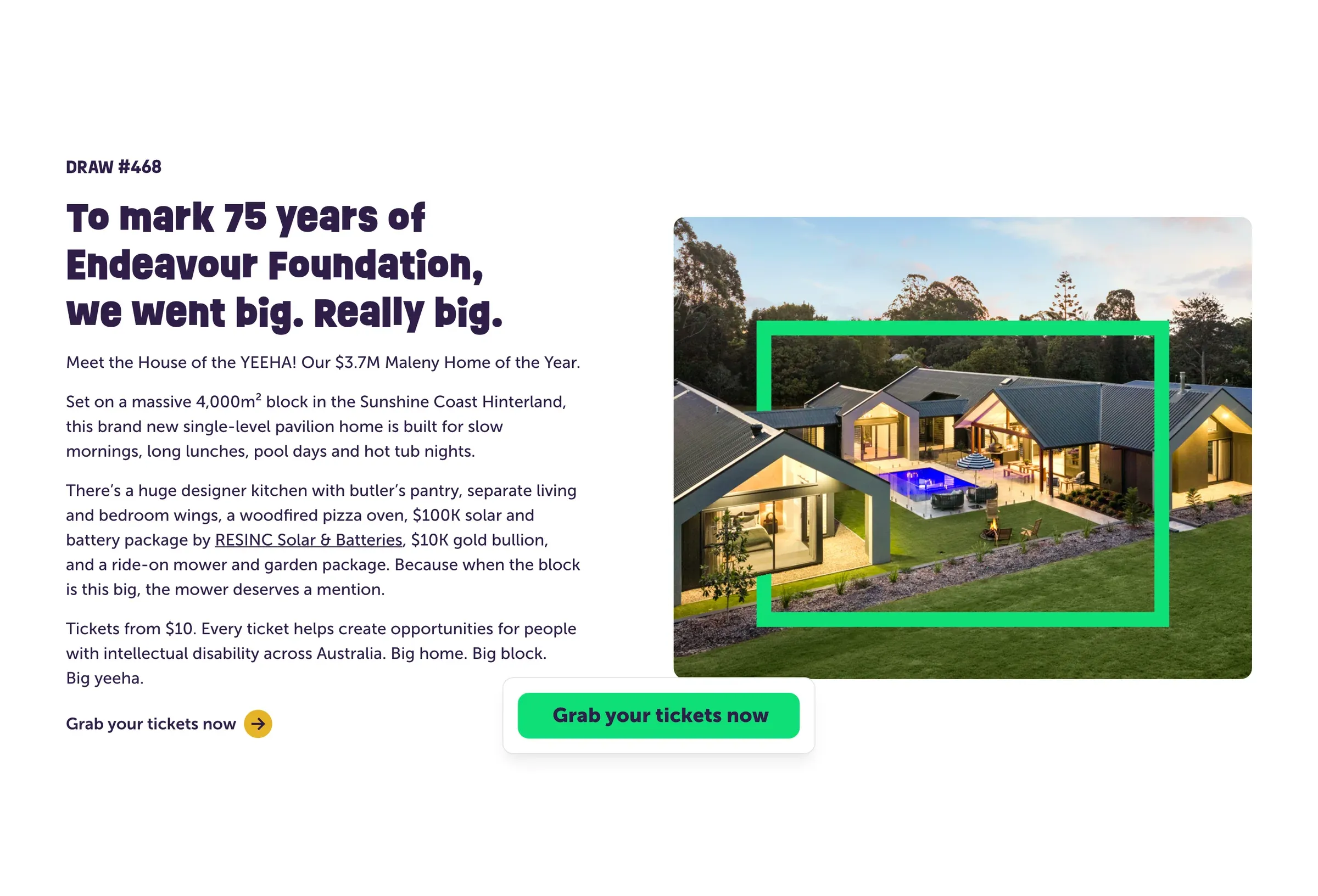
A Prize Home draw page on Endeavour Lotteries’ Webflow site. Its marketing team builds each new draw from about 20 components.

Altus in German, from the same Webflow site as the English version, with translated addresses under /de.
For developers: how each handles code
Both let developers add custom code, in different places:
- Framer has code components: custom React components written in Framer’s built-in code editor, with controls so designers can set them up on the canvas (Framer).
- Webflow has code components too: React components built in your own codebase and shared into Webflow with its command-line tool, where designers configure them on the canvas. They’re included on the Premium plan (Webflow). Pages and sites can also take custom code embeds.
The practical difference is where the code lives. In Framer, it’s inside Framer’s editor. In Webflow, developers keep working in their own repository and tools, and the site’s designers use what they ship.
How to choose
- Who will run the site after launch? If it’s designers, Framer is quick and pleasant. If it’s a marketing team publishing every week, Webflow’s components and CMS are built for that.
- How much content will it hold? Count your posts, case studies, resources and events now, and in two years. Past a few thousand items, Webflow’s limits are much higher for the price.
- One language or several? Both translate. Webflow Localize adds localised SEO, and translated addresses on its Advanced plan, which matter if each market needs to rank on its own.
- How important is motion? If the site’s job is to impress on a launch, Framer’s strengths show. If its job is to rank, answer questions and convert over years, Webflow’s structure pays off.
If you’re weighing other options too, see Webflow vs WordPress and Webflow vs Astro.
Questions we get asked
Is Framer better than Webflow?
It depends on the site. Framer is often quicker for a designer building a small, polished, animated site. Webflow suits a marketing team running a larger site, with more CMS content, several editors, translations and more control over structure and SEO.
Is Framer good for building websites?
Yes, especially design-led sites with modest content: launch pages, portfolios and startup sites. Its Pro plan includes 150 pages and 2,500 CMS items, with add-ons up to 700 pages and 40,000 items, as of October 2026.
Is Webflow or Framer better for SEO?
Both handle the basics: titles, descriptions, sitemaps, redirects on paid plans and fast hosting. Webflow gives more control on larger sites, with SEO fields and schema markup on every CMS template, and an Audit panel for missing titles, descriptions and alt text.
Can you move a site from Framer to Webflow?
Yes. The pages are rebuilt in Webflow rather than imported, the CMS content is moved across, and every old address is redirected to its new page so search rankings carry over. Our website migration services cover moves like this.
If you’d like help choosing, or a Webflow site built for your team, see our Webflow agency work, or tell us about your site.
This guide is part of Webflow for marketing teams, which brings together everything we’ve written on choosing, building and running a Webflow site.
Sources
- Framer, Pricing, read 17 October 2026
- Webflow, Plans & pricing, read 17 October 2026
- Webflow, Updated pricing and simplified plans for May 2026
- Webflow, Audit and improve SEO & AEO with Webflow AI
- Framer, Code components
- Webflow, Code components