
Services
Strategy
We find the clearest path from what your business needs to what your website should do.
What’s included
- Page strategy
- Landing page strategy
- Site architecture
- Content planning
- Wireframes
- Migration planning




Branding
We shape a distinct visual identity that works on screen first and carries through everything you make.
What’s included
- Visual identity
- Brand refresh
- Colour & typography
- Moodboards & direction
- Brand guidelines
- Digital brand systems
Recent work


Design
We turn the plan into a distinct, usable design that feels right for your brand and works across every screen.
What’s included
- Website design
- UI design
- Responsive design
- Design systems
- Visual direction
- Content presentation


Development
We build fast, reliable websites in Webflow or with custom code, with the integrations each project needs.
What’s included
- Webflow development
- Custom website development
- Custom interactions
- Performance engineering
- CRM & email integrations
- Booking & payments


SEO & AI search
We make your site easy for search engines and AI assistants to find, understand and point people to.
What’s included
- Technical SEO
- AI search & AEO
- Structured data
- Answer-ready content
- Core Web Vitals
- AI crawler access
Optimisation
We keep improving what happens after launch, using real behaviour data to turn more visitors into enquiries.
What’s included
- Conversion optimisation
- A/B changes
- Landing pages
- Copy reworks
- Analytics & heatmaps
- Monthly improvements
Recent work


Latest
The newest posts, across every topic.



Design
Planning and designing websites, and the tools we use.



Development
Webflow, Astro, Claude Code, CMS choices and what builds really take.

SEO & AI search
Getting found in Google and quoted by AI assistants.


Studio
How we run projects, from proposals to launch week.



Webflow MCP: what it does and how we use it
Webflow MCP connects Claude, ChatGPT and other AI tools to your Webflow site: what it can do, how to connect it, and how we use it for migrations and CMS.
- Written by
 Matthew Bishop
- Published
- Reading time
- 6 minutes
The Webflow MCP server connects AI tools such as Claude, ChatGPT, Cursor and Gemini to your Webflow sites, so an agent can read and change pages, components, styles and CMS content from a chat. It’s free on every Webflow plan, it follows your site’s roles and permissions, and every change it makes is recorded in the site’s activity log. We use it for three jobs: migrations, CMS content, and building pages from a site’s components.
Migrations that used to take us hours now take about 10 minutes with Claude and the Webflow MCP. Here’s what it can do on 21 October 2026, how to connect it, and how we and our clients use it.
What the Webflow MCP can do
Webflow has shipped three big updates since July 2026 (Webflow):
- Build with your design system. Agents use your styles, elements and components, including props, slots and variants, so new pages stay on brand and easy to maintain.
- Create and manage CMS content. Agents add and edit CMS items and connect components to CMS fields. Since September they can sort, filter and page through content, including custom and reference fields, in one request.
- Add interactions. Scroll, hover, load and click interactions, built on Webflow’s GSAP-powered interactions, the same way you would on the canvas.
- Read your site’s performance. Page-level traffic and goals from Analyze, experiment results from Optimize, and AEO Analytics, such as the pages AI crawlers request most.
- Work safely. Agents can work on branches before changes reach your live site, follow your roles down to each site, collection, page and locale, and leave a record in the activity log. Managing branches through the MCP is on Enterprise plans only.
- Follow your rules. Agent Instructions hold your design system, voice and tone, legal wording and SEO rules, for Webflow’s own AI and any agent using the MCP.
Most of this works without Webflow’s bridge app. You still need the bridge app open in the Designer for anything that needs to see the canvas, like “change this heading”.
How to connect Claude to Webflow
- In Claude, open the + menu, choose Connectors and add Webflow.
- Click Connect, choose the sites or Workspaces Claude can reach, and authorise.
- Ask Claude about your site, starting with something read-only, like “list the CMS collections on this site”.
ChatGPT and Gemini have Webflow connectors too, and developers can add the server to Claude Code or Cursor. Reviewers can’t authorise the connection, and the agent can only do what your own role allows (Webflow).
How we use it
Migrations
- New Word Order: for their new Webflow site, we moved their projects across from Craft CMS. Claude converted the Craft export from XML to JSON and resized oversized images, then the Webflow MCP cleaned up the formatting left in the imported text, the manual tidy-up that usually eats the end of a migration.
- Smokeball: we used Claude connected to Webflow to carry testimonials and resources across the three regional sites.
The move itself is fast now. Mapping old addresses to new ones and checking every redirect still takes a person; see website migration SEO.
CMS content
Fresh Clinics publishes gated resources, such as its clinic launch guide. Each one is two CMS items: a public page with a HubSpot form, in a collection we set up, and a gated success page that isn’t indexed, with Australian versions under /en-au/ and US versions at the root. Fresh Clinics’ marketing manager set up a Claude automation with the Webflow MCP that fills both collections for each new resource, with a HubSpot form copied from a master form, without a developer. Five resources were live on 21 October 2026.
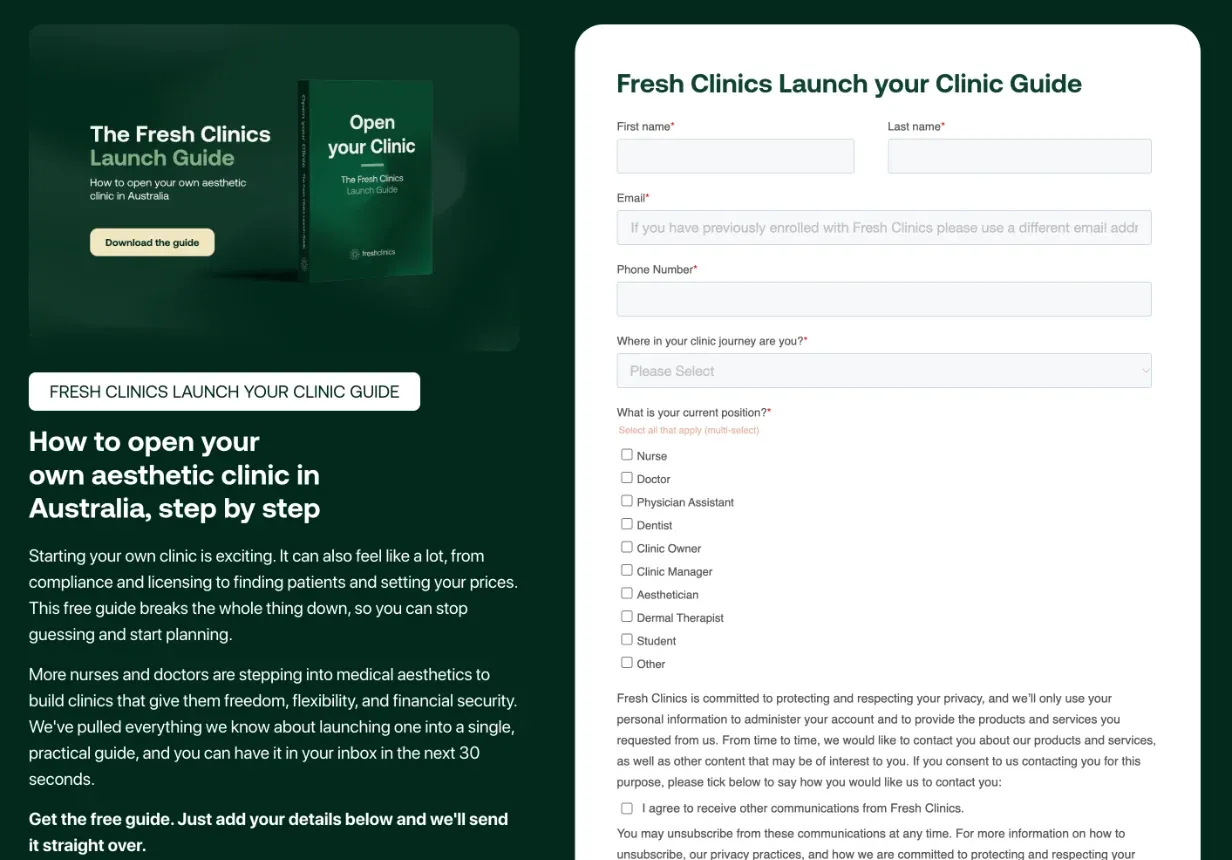
One of Fresh Clinics' gated resources on freshclinics.com, read 21 October 2026. Each resource is a public page like this one and a gated success page, both CMS items.
The everyday version is smaller: rewriting meta titles and descriptions across a blog, or tidying a collection’s fields, in one conversation instead of an afternoon of clicking through items.
Building with components
When we hand a site over, we show the team how to draft in Claude and send it to Webflow as a draft. In Altus’ handover training, that sat alongside building pages from the site’s prebuilt sections: write in Claude, send it to Webflow, then review it before publishing. We also use Claude for content that’s fiddly to build by hand, like turning a comparison into a table Webflow can render.
This only works as well as the site underneath. An agent building from a tidy component library, with clear names and props, makes pages that look like the rest of the site. Given a site of one-off pages, it makes more one-off pages. See Can marketers use Webflow without developers?
What to set up first
- Agent Instructions. Write down your brand voice, SEO rules and anything legal that can’t change, so every agent starts from them.
- Roles. Connect with the narrowest role that does the job. A content writer’s agent doesn’t need to change components.
- Review before publishing. Have agents create drafts, or work on a branch, and check every change on staging. The activity log shows what each agent changed.
- Start read-only. Ask for an audit before you ask for changes: missing alt text, empty meta descriptions, CMS items without a category.
Webflow is building agents further into its platform, with Source by Webflow for whole teams and Webflow Campaigns for landing pages and ads. If you’d like the MCP set up on your site, or a migration done with it, tell us about your site.
Questions we get asked
What is the Webflow MCP?
The Webflow MCP is a server that connects AI tools such as Claude, ChatGPT, Cursor and Gemini to your Webflow sites. An agent can read and change pages, components, styles and CMS content, and read Analyze, Optimize and AEO data, within the permissions of the person who connected it.
Is the Webflow MCP free?
Yes. Webflow says MCP 2.0 is available to all users at no additional cost. You’ll need a plan for the AI tool you connect, such as Claude or ChatGPT, and some features, like managing branches through the MCP, are on Enterprise plans only.
How do I connect Claude to Webflow?
In Claude, open the + menu, choose Connectors, add Webflow, click Connect, then choose the sites or Workspaces Claude can reach and authorise. Reviewers can’t authorise the connection, and Claude can only do what your role allows.
Can the Webflow MCP edit CMS content?
Yes. Agents can create and update CMS items, connect components to CMS fields, and since September 2026 sort, filter and page through items, including custom and reference fields, in one request. We use it for migrations and bulk updates like meta descriptions.
Is it safe to let an agent change our live site?
It can be, with guardrails. The MCP follows your roles and permissions, records every change in the activity log, and can work on branches or drafts. Have agents draft, review on staging, and only then publish.
Sources
- Webflow, Introducing MCP 2.0, 21 July 2026
- Webflow, MCP adds interactions, faster CMS access, and Webflow Cloud, 21 September 2026
- Webflow, MCP adds Analyze, Optimize, and AEO Analytics data, plus a Gemini connector, 15 October 2026
- Webflow Help Center, Connect Claude to Webflow, read 21 October 2026