
Services
Strategy
We find the clearest path from what your business needs to what your website should do.
What’s included
- Page strategy
- Landing page strategy
- Site architecture
- Content planning
- Wireframes
- Migration planning




Branding
We shape a distinct visual identity that works on screen first and carries through everything you make.
What’s included
- Visual identity
- Brand refresh
- Colour & typography
- Moodboards & direction
- Brand guidelines
- Digital brand systems
Recent work


Design
We turn the plan into a distinct, usable design that feels right for your brand and works across every screen.
What’s included
- Website design
- UI design
- Responsive design
- Design systems
- Visual direction
- Content presentation


Development
We build fast, reliable websites in Webflow or with custom code, with the integrations each project needs.
What’s included
- Webflow development
- Custom website development
- Custom interactions
- Performance engineering
- CRM & email integrations
- Booking & payments


SEO & AI search
We make your site easy for search engines and AI assistants to find, understand and point people to.
What’s included
- Technical SEO
- AI search & AEO
- Structured data
- Answer-ready content
- Core Web Vitals
- AI crawler access
Optimisation
We keep improving what happens after launch, using real behaviour data to turn more visitors into enquiries.
What’s included
- Conversion optimisation
- A/B changes
- Landing pages
- Copy reworks
- Analytics & heatmaps
- Monthly improvements
Recent work


Latest
The newest posts, across every topic.



Design
Planning and designing websites, and the tools we use.



Development
Webflow, Astro, Claude Code, CMS choices and what builds really take.

SEO & AI search
Getting found in Google and quoted by AI assistants.


Studio
How we run projects, from proposals to launch week.



Webflow Campaigns: what it is and who it suits
Webflow Campaigns explained: on-brand landing pages and ads from one brief, the tools it connects to, pricing, and when your Webflow site already does the job.
- Written by
 Matthew Bishop
- Published
- Reading time
- 6 minutes
Webflow Campaigns is a standalone Webflow tool for demand-gen and performance marketers. It pulls your brand into a design system, helps you write a campaign brief, then generates on-brand landing pages, audience variations and matching ads, connects HubSpot or Marketo forms, sends ads to Google Ads and reports on pipeline. It works alongside any CMS, so your main site doesn’t have to be on Webflow. Webflow made it available on 20 October 2026, sold through its sales team, with no public pricing on 21 October 2026.
We build Webflow sites that marketing teams launch their own landing pages from, with Salesforce and HubSpot forms behind them. Here’s what Campaigns does, and when the Webflow site you already have does the same job.
How Webflow Campaigns works
Webflow describes four stages, with agents helping at each one (Webflow):
- Ideate. Campaigns extracts your brand from your existing website into a reusable design system: typography, colours and styling. You can also give it a design.md file with your brand guidelines. Then you write a brief, or paste one in, with an agent helping refine the audience and messaging.
- Build. One brief produces the landing page, variations for each persona, industry or account, each with its own address, and ad creative in a range of sizes that carries the same message.
- Launch. Publish the pages, connect HubSpot or Marketo forms, and push ads to Google Ads Performance Max without leaving the tool.
- Iterate. Built-in reporting shows sessions and conversions, Salesforce and HubSpot connect results to pipeline, and AI recommendations suggest what to improve.
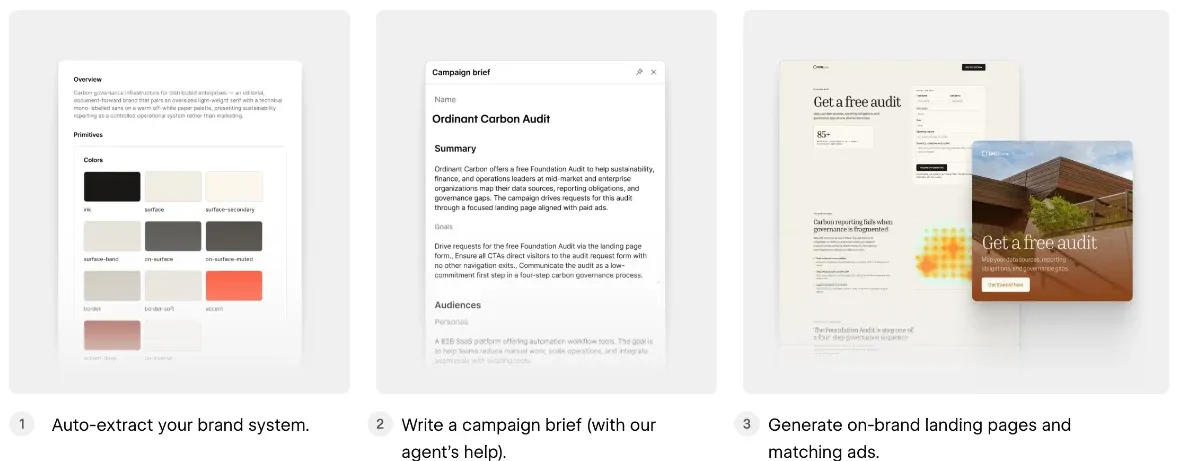
From Webflow's Campaigns page, read 21 October 2026: the brand system, the brief, and the landing page with its matching ad.
You can also build and edit campaign pages from Claude or ChatGPT through Webflow’s MCP server, or edit copy and layouts in Campaigns’ visual editor.
What it connects to
| Job | Tools, as Webflow lists them |
|---|---|
| Forms and lead capture | HubSpot, Marketo |
| Pipeline attribution | HubSpot CRM, Salesforce |
| Ads | Google Ads Performance Max |
| AI tools | Claude, ChatGPT and other tools through Webflow’s MCP server |
| Your website | Any CMS: the site doesn’t need to run on Webflow |
From webflow.com/feature/campaigns, read 21 October 2026.
Salesforce is listed for attribution, not forms. Teams whose forms post straight into Salesforce should check how those would connect before they start.
Campaigns, or landing pages in your Webflow site?
If your site is already on Webflow, your marketing team may already be able to do much of this. It depends on how the site was built.
- Smokeball runs three regional sites from one library of 248 components, with Salesforce forms and tracking. We built the library so their team can put a new landing page together from parts that already work on all three sites, with a goal of under half an hour a page.
- Endeavour Lotteries’ marketing team builds campaign pages from about 20 components.
- Altus has HubSpot forms on the pages that need them, each with its own thank-you page, while demo booking runs separately (how we set it up).
- Fresh Clinics uses HubSpot forms across the Australian and US versions of its site.
None of these needs a separate tool to launch a page. What Campaigns adds is everything around the page: the brief, audience variations at scale, matching ads, Google Ads and pipeline reporting in one place.
| Webflow Campaigns | Landing pages in your Webflow site | |
|---|---|---|
| Your main site | Any CMS | On Webflow |
| Brand | Extracted from your site, or a design.md file | Your site’s own components and styles |
| Who builds | Marketers, with agents, from a brief | Your team, from the component library |
| Forms | HubSpot, Marketo | Webflow forms, or embedded HubSpot, Marketo or Salesforce forms |
| Variations | One per persona, industry or account, each with its own address | Built page by page, or from a CMS template |
| Ads | Generated to match, sent to Google Ads | Made and run separately |
| Reporting | Sessions, conversions and pipeline in the tool | Your analytics and CRM |
| Price | Through Webflow’s sales team | Included in your site plan |
Campaigns from Webflow's own pages, read 21 October 2026. The right-hand column is how the Webflow sites we build work.
Who Campaigns suits
Webflow says Campaigns is built for demand generation, growth and performance marketing teams that need to launch campaigns faster and connect results to pipeline: paid acquisition, webinars, events and account-based campaigns. It works whether your main site runs on Webflow, WordPress or another platform, as a standalone product with no connection to your CMS (Webflow). Webflow quotes Exiger, whose team used to mock pages up in Lovable and then rebuild them in WordPress.
Our view, from the Webflow sites we’ve built:
- It fits best when you run a lot of campaigns. If every campaign needs a version for each industry or account, matching ads in Google Ads and pipeline reporting, Campaigns puts that in one workflow your web team doesn’t have to staff.
- It’s a quick way in if your site isn’t on Webflow. You get on-brand landing pages without rebuilding the main site first.
- If you’re on Webflow with a component library and run a handful of campaigns, your site may already be enough. Pages built there share your domain, navigation, CMS and forms, at no extra cost. Because Campaigns isn’t connected to your CMS, pages made there live outside the site.
If you’re weighing it up, the Webflow for marketing teams guide covers how teams run Webflow sites, and Source by Webflow is where Webflow says the wider platform is heading. Or tell us about your campaigns and we’ll say honestly which we’d use.
Questions we get asked
What is Webflow Campaigns?
Webflow Campaigns is a standalone tool for demand-gen and performance marketers. From one brief, it generates on-brand landing pages, audience variations and matching ads, connects HubSpot or Marketo forms, sends ads to Google Ads and reports on pipeline. Webflow made it available on 20 October 2026.
Does my site need to be on Webflow to use Campaigns?
No. Webflow says Campaigns is a standalone product with no connection to your CMS, so it works whether your main site runs on Webflow, WordPress or another platform. It extracts your brand from your existing website and builds campaign pages from that.
How much does Webflow Campaigns cost?
Webflow hasn’t published a price. On 21 October 2026, Campaigns is sold through Webflow’s sales team, so you’ll need to contact them for a quote. It’s separate from Webflow’s site plans.
Which tools does Webflow Campaigns connect to?
HubSpot and Marketo for forms, HubSpot and Salesforce for pipeline attribution, and Google Ads for Performance Max campaigns. You can also build and edit pages from Claude or ChatGPT through Webflow’s MCP server.
Can I use Claude with Webflow Campaigns?
Yes. Webflow says compatible AI tools such as Claude and ChatGPT can build and refine campaign landing pages through its MCP server, alongside Campaigns’ own visual editor and AI assistant.
Do we need Campaigns if our site is already on Webflow?
Not necessarily. If your team builds landing pages from the site’s own components, you already have the pages. Campaigns adds briefs, variations at scale, matching ads and pipeline reporting, which suits teams running many paid campaigns.
Sources
- Webflow, A first look at Campaigns, updated 20 October 2026, read 21 October 2026
- Webflow, Webflow Campaigns, read 21 October 2026
- CMSWire, Webflow Campaigns brings on-brand landing pages, ads and analytics, October 2026