
Services
Strategy
We find the clearest path from what your business needs to what your website should do.
What’s included
- Page strategy
- Landing page strategy
- Site architecture
- Content planning
- Wireframes
- Migration planning




Branding
We shape a distinct visual identity that works on screen first and carries through everything you make.
What’s included
- Visual identity
- Brand refresh
- Colour & typography
- Moodboards & direction
- Brand guidelines
- Digital brand systems
Recent work


Design
We turn the plan into a distinct, usable design that feels right for your brand and works across every screen.
What’s included
- Website design
- UI design
- Responsive design
- Design systems
- Visual direction
- Content presentation


Development
We build fast, reliable websites in Webflow or with custom code, with the integrations each project needs.
What’s included
- Webflow development
- Custom website development
- Custom interactions
- Performance engineering
- CRM & email integrations
- Booking & payments


SEO & AI search
We make your site easy for search engines and AI assistants to find, understand and point people to.
What’s included
- Technical SEO
- AI search & AEO
- Structured data
- Answer-ready content
- Core Web Vitals
- AI crawler access
Optimisation
We keep improving what happens after launch, using real behaviour data to turn more visitors into enquiries.
What’s included
- Conversion optimisation
- A/B changes
- Landing pages
- Copy reworks
- Analytics & heatmaps
- Monthly improvements
Recent work
Latest
The newest posts, across every topic.



Design
Planning and designing websites, and the tools we use.



Development
Webflow, Astro, Claude Code, CMS choices and what builds really take.

SEO & AI search
Getting found in Google and quoted by AI assistants.


Studio
How we run projects, from proposals to launch week.



Webflow forms: native, HubSpot or Salesforce?
Webflow forms compared with HubSpot and Salesforce forms on a Webflow site: spam, tracking, styling and who maintains them, from forms we've built for clients.
- Written by
 Matthew Bishop
- Published
- Reading time
- 6 minutes
Use native Webflow forms when submissions only need to reach an inbox, or a CRM through Webflow’s integrations. Use your CRM’s own forms, such as HubSpot or Salesforce Account Engagement, when your marketing automation, lead routing and attribution live there, because the form then stays in the tool that acts on it. Native Webflow forms have unlimited submissions on paid site plans, with spam filtering, bot blocking and reCAPTCHA built in. A form that posts somewhere else skips all of that, so it needs its own spam protection.
We’ve built all three on client sites: Webflow forms connected to HubSpot for Smileyscope, embedded HubSpot forms for Altus and Fresh Clinics, and Salesforce forms across Smokeball’s three regional sites. Here’s how each works, and how to choose.
The options compared
| Webflow form | Embedded HubSpot form | Salesforce Account Engagement form | |
|---|---|---|---|
| Built in | Webflow | HubSpot | Salesforce |
| Submissions go to | Webflow, with email notifications, and on to a CRM through an integration | HubSpot | Salesforce |
| Styling | Full control in Webflow | HubSpot, or your site’s CSS with raw HTML | Your site, or a stylesheet hosted in Salesforce |
| Spam protection | Webflow’s spam filtering, bot blocking and reCAPTCHA | HubSpot’s CAPTCHA and filters | Added in the form code |
| Campaign tracking | Hidden fields, or the CRM’s tracking code | Hidden fields and HubSpot’s tracking cookie | Hidden UTM fields in each form |
| Who changes it | Whoever edits the site, keeping field names in step with the CRM | The marketing team, in HubSpot | Whoever manages Salesforce, with the site’s embed kept in step |
| Our example | Smileyscope, connected to HubSpot | Altus, Fresh Clinics | Smokeball |
From Webflow's and HubSpot's help pages and the forms we've built, read 21 October 2026.
Native Webflow forms
A Webflow form is a form block you design like anything else on the page. Submissions are stored in Webflow and emailed to the addresses you choose, and you can send them on to other tools through Webflow’s integrations (Webflow).
- Submissions: unlimited on every paid site plan. The free Starter plan stops collecting after 50 in total.
- File uploads: up to 10 GB of storage free, then US$0.50 a GB a month, to a hard limit of 100 GB.
- Spam: spam filtering moves suspected spam to its own inbox, bot blocking applies to every form on the site, and Webflow supports reCAPTCHA v2. Turning reCAPTCHA on applies it to every form, and any form without the reCAPTCHA element then fails to submit (Webflow).
Smileyscope’s contact and newsletter forms are Webflow forms, styled in the site’s own type and colours and connected to HubSpot for lead tracking, with Cloudflare Turnstile checking for bots.
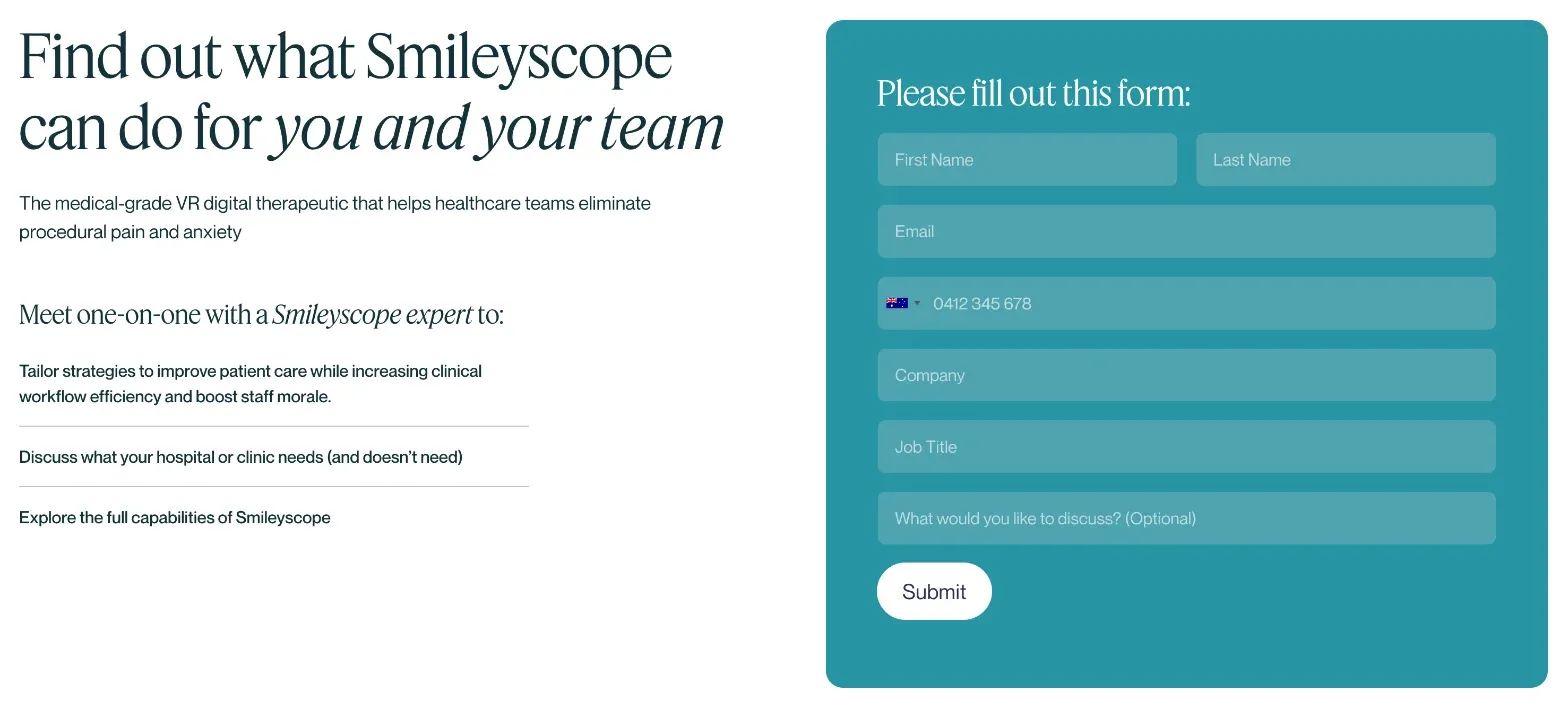
Smileyscope's contact form on smileyscope.com, read 21 October 2026: a Webflow form, connected to HubSpot.
HubSpot forms
If your team already lives in HubSpot, building forms there keeps every HubSpot feature, and the team can change fields and follow-ups without touching the site.
- Altus uses embedded HubSpot forms on the pages that need them, each with its own thank-you page. They use HubSpot’s raw-HTML option rather than an iframe, so the site’s own styles apply, and Altus’s team still builds and edits them in HubSpot.
- Fresh Clinics kept all 383 of its HubSpot forms in HubSpot when its site moved from HubSpot’s CMS to Webflow, using raw HTML instead of iframes where a form needed the site’s styling.
The full setup, including Webflow’s HubSpot app and the tracking code, is in how to connect HubSpot forms to Webflow.
Salesforce forms
Smokeball runs its forms on Salesforce Account Engagement, formerly Pardot. When we rebuilt its three regional sites in Webflow, the forms had to keep feeding the same campaigns, so we kept its existing form handlers and forms rather than replacing them at launch.
- Embedded with custom code. The forms are embedded in Webflow with custom code and styled from a stylesheet hosted in Salesforce, so the forms are managed in Salesforce rather than rebuilt in Webflow.
- Hidden fields must match exactly. Each form carries hidden UTM fields for source, medium, campaign, content and term, filled from the visitor’s tracking. If a hidden field’s name doesn’t match the handler’s, submissions break.
- Spam protection is added by hand. A form that posts straight to Salesforce bypasses Webflow’s own processing: no Webflow storage, notifications or spam filtering, and Webflow’s native reCAPTCHA doesn’t apply. So reCAPTCHA sits in the form code, and the busiest forms, like Book a Demo, also go through Basin, a form spam filter.
- Built as site components. Each form is a component on its own site rather than in the shared library the three sites use. A new form starts as a copy of an existing one, unlinked, with its handler and fields updated. For CMS pages, like webinars, the pattern is a form ID field in the CMS, passed into a prebuilt embed.
Webflow’s new Campaigns tool lists HubSpot and Marketo for forms, and Salesforce for pipeline reporting, so teams with Salesforce forms should check how theirs would connect.
Sites built as code
On a site built as code, a form is whatever you build. Ours posts to our own API route, which sends each enquiry through Resend. That’s full control, but spam protection, storage and notifications are all yours to build and look after. See Webflow vs Astro.
Before you launch any form
- Decide where every lead must end up, and who will act on it there. That decides the form tool, not the design.
- Carry campaign tracking through. Hidden UTM fields, or the CRM’s tracking code, so every submission says where it came from.
- Protect every form from spam, especially any that post outside Webflow.
- Send people to a thank-you page, so each conversion can be tracked and the next step is clear.
- Put consent wording on the form, in the CRM’s consent fields where it has them.
- Test every form on staging, then again after launch, and check the submission arrives where it should, with its tracking.
Questions we get asked
Are Webflow form submissions unlimited?
Yes, on every paid Webflow site plan. The free Starter plan stops collecting submissions after 50 in total, and that count never resets. File uploads get 10 GB of storage free, then US$0.50 a GB a month, up to 100 GB.
How do I connect Webflow forms to Salesforce?
The usual way is to use Salesforce’s own forms: embed Salesforce Account Engagement forms or form handlers on the Webflow page with custom code, and match every hidden field to the handler. Those submissions skip Webflow’s spam filtering, so add reCAPTCHA or a spam filter yourself.
Can I use HubSpot forms on a Webflow site?
Yes. Webflow’s HubSpot app embeds HubSpot forms, as an iframe or styled in Webflow, or connects Webflow forms to HubSpot. Our full guide covers which to use and the setup checklist.
How do I stop spam on Webflow forms?
Turn on spam filtering and bot blocking in your site settings, and add reCAPTCHA if you need more. reCAPTCHA then applies to every form on the site. Forms that post to another tool need that tool’s protection, or reCAPTCHA in their own code.
Should we use Webflow forms or our CRM’s forms?
Use your CRM’s forms if your marketing automation, lead routing and attribution live there. Use Webflow forms when submissions only need to reach an inbox or a simple integration, or when you want full design control.
Sources
- Webflow Help Center, Form submissions, read 21 October 2026
- Webflow Help Center, Prevent spam in form submissions, read 21 October 2026
- Webflow Help Center, Install and use the HubSpot app