
Services
Strategy
We find the clearest path from what your business needs to what your website should do.
What’s included
- Page strategy
- Landing page strategy
- Site architecture
- Content planning
- Wireframes
- Migration planning




Branding
We shape a distinct visual identity that works on screen first and carries through everything you make.
What’s included
- Visual identity
- Brand refresh
- Colour & typography
- Moodboards & direction
- Brand guidelines
- Digital brand systems
Recent work


Design
We turn the plan into a distinct, usable design that feels right for your brand and works across every screen.
What’s included
- Website design
- UI design
- Responsive design
- Design systems
- Visual direction
- Content presentation


Development
We build fast, reliable websites in Webflow or with custom code, with the integrations each project needs.
What’s included
- Webflow development
- Custom website development
- Custom interactions
- Performance engineering
- CRM & email integrations
- Booking & payments


SEO & AI search
We make your site easy for search engines and AI assistants to find, understand and point people to.
What’s included
- Technical SEO
- AI search & AEO
- Structured data
- Answer-ready content
- Core Web Vitals
- AI crawler access
Optimisation
We keep improving what happens after launch, using real behaviour data to turn more visitors into enquiries.
What’s included
- Conversion optimisation
- A/B changes
- Landing pages
- Copy reworks
- Analytics & heatmaps
- Monthly improvements
Recent work
Latest
The newest posts, across every topic.



Design
Planning and designing websites, and the tools we use.

Development
Webflow, Astro, Claude Code, CMS choices and what builds really take.


SEO & AI search
Getting found in Google and quoted by AI assistants.



Studio
How we run projects, from proposals to launch week.



Webflow project benchmarks: seven real builds
Pages, markets, redirects, CMS content and component libraries across seven Webflow builds we’ve delivered, and what the numbers mean for scoping yours.
- Written by
 Matthew Bishop
- Published
- Reading time
- 7 minutes
Across seven Webflow builds we’ve delivered, sites ranged from 7 pages to more than 1,600, four served more than one country or language, and redirects ranged from a handful to 645. What drove the size of each job wasn’t the design: it was the old site’s structure, the number of markets, and how much CMS content moved across.
These are the numbers from our published case studies, side by side, so you can see where your own project might sit. Every figure is one we’ve published before; where a project has no figure, the table says so.
The seven builds at a glance
| Project | Industry | Moved from | Pages | Markets or languages | Sites |
|---|---|---|---|---|---|
| Smokeball | Legal software | An earlier Webflow build | 1,600+ | Australia, US, UK | 3 |
| Fresh Clinics | Medical aesthetics | HubSpot CMS | 340+ | Australia, US | 1 |
| Altus | Project management software | WordPress | 220+ | English, German | 1 |
| Skip | Home lending | An earlier Webflow build, new domain | 78 | Australia | 1 |
| Smileyscope | Medical technology | Wix | 33 | Australia, US | 1 |
| Econohealth | Telehealth | New site | 7 | Australia | 1 |
| Endeavour Lotteries | Charity lottery | New site | Not published | Australia | 2 |
Pages include CMS items such as articles and case studies, as published in each case study.
Three things stand out:
- Page counts are mostly CMS content. The three largest sites are large because of articles, case studies and resources, not because of designed pages. Most of a large site’s pages share a handful of CMS templates.
- Only one in seven came from WordPress. The rest moved from Wix, HubSpot, an earlier Webflow build, or nothing at all, so a “migration” covers very different jobs.
- More than one market is common. Four of the seven serve more than one country or language, and three of those do it from a single site.
Redirects: what the old site decides
| Project | What moved | Redirects |
|---|---|---|
| Smokeball | Australian and UK sites, to new builds | 645: 399 for Australia, 246 for the UK, with no redirect chains |
| Fresh Clinics | 150+ articles and the site, off HubSpot | 324 |
| Skip | A whole site, to a new name and domain | Every page, one for one |
| Altus | A site whose addresses barely changed | A handful |
The number of redirects follows the old site, not the new one. Altus needed only a handful because most of its addresses stayed the same. Fresh Clinics needed 324 because years of articles lived at addresses that had to change, and Smokeball needed 645 across two countries. Skip changed its name and domain, so every old address redirects to the same page on the new one, and its rankings held through the move.
The lesson for scoping: count the old site’s pages and decide what happens to each before you estimate the move (our migration plan).
Markets and languages: one site or several
| Project | Set-up | How it’s run |
|---|---|---|
| Altus | English and German, translated versions of one site | German under /de, with translated addresses and hreflang |
| Fresh Clinics | Australian and US versions of one site | One Webflow site, with a version for each country |
| Smileyscope | Australian and US versions of one site | Launched on day one of a trade show in Dubai |
| Smokeball | Three separate regional sites on one component library | Each country has its own marketing team, pages and pricing |
Three of the four run every market from one Webflow site. Smokeball is the exception: each country has its own marketing team and growth playbook, and each site kept its own domain through the move. The deciding question is who approves and publishes each version, not the technology (one site or several).
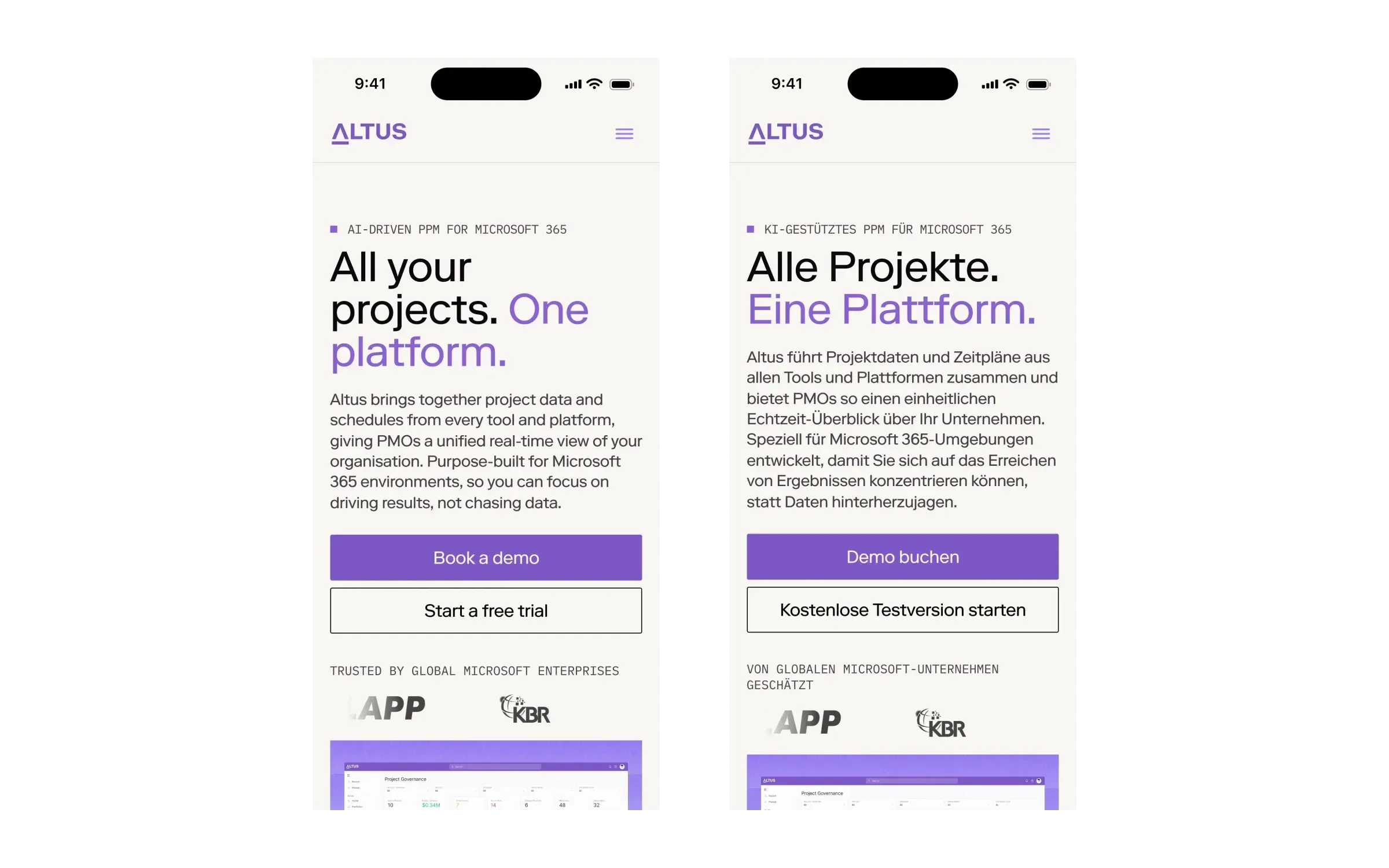
Altus’ English and German home pages. The German version lives under /de on the same Webflow site.
CMS content: where the volume is
| Project | Content in the CMS |
|---|---|
| Smokeball (US site) | 1,182 items in 13 collections, from 11 exports of the old site, including 718 blog posts, 77 case studies, 65 legal resources and 59 speaker profiles |
| Fresh Clinics | 150+ articles moved from HubSpot, and 90+ FAQs stored once and shown wherever they belong |
| Altus | 47 blog posts and 24 integration pages, run by the marketing team |
| Skip | 47 articles and resources, carried across at the same addresses |
| Econohealth | 19 questions, filterable by topic |
Content volume is where migrations take their time. Smokeball’s old site had grown messy, so we fixed the structure on the way in: three overlapping webinar collections became one, and presenters became a reusable set of speaker profiles. Storing something once, like Fresh Clinics’ FAQs, means one edit updates every page it appears on.
Component libraries: sized to the job
| Project | Library |
|---|---|
| Smokeball | 248 components and 86 variables, shared by three regional sites |
| Endeavour Lotteries | About 20 clearly named components the marketing team builds campaign pages from |
A bigger library isn’t a better one. Smokeball needed 248 components to run three countries’ sites from one system. Endeavour needed about 20, named so its marketing team could build every new draw page without a developer. Size the library to what your team will actually build (publishing pages without a developer).
What the numbers mean for your project
- Count templates, not pages. A site’s page count is mostly CMS content. What drives design and build effort is the number of distinct templates.
- Audit the old site before you scope the move. Redirects ranged from a handful to 645, depending entirely on how much the old addresses change.
- Decide on markets early. It shapes the structure, the CMS and the component library, so it can’t wait until after the build.
- Plan content as a project of its own. Hundreds of articles, case studies and FAQs take longer to move and check than the pages around them.
For the cost side of the same decisions, see how much a Webflow website costs.
How we counted
Every figure comes from a case study on this site, as published on 11 October 2026. Pages include CMS items, and a “+” means the figure is rounded down. Redirects are the permanent redirects set at launch. Where a figure isn’t ours to publish, or a project didn’t need it, it’s left out rather than estimated. We haven’t included timelines, because each project’s depended as much on content and approvals as on the build.
Questions we get asked
How many pages does a typical Webflow site have?
It varies with the content more than the design. Across seven builds, sites ranged from 7 pages to more than 1,600, with most of the larger counts made up of CMS items such as articles and case studies. The number of distinct templates is a better measure of the work.
How many redirects does a Webflow migration need?
It depends on how much the old addresses change. Across our builds, Altus needed only a handful, Fresh Clinics needed 324 and Smokeball needed 645 across two countries. A move to a new domain, like Skip’s, needs a redirect for every page.
Can one Webflow site serve several countries?
Usually. Three of the four multi-market sites we’ve built run every market from one Webflow site, with localised versions or translations. Separate sites made sense for Smokeball, where each country has its own marketing team, pages and pricing.
How big should a Webflow component library be?
Big enough for the pages your team will build, and no bigger. Smokeball’s library has 248 components because it runs three regional sites; Endeavour Lotteries’ has about 20, so its marketing team can build every campaign page quickly.
If you’d like to see where your project would sit, tell us about it.
This post is part of Webflow for marketing teams, which brings together everything we’ve written on choosing, building and running a Webflow site.