Services
Strategy
We find the clearest path from what your business needs to what your website should do.
What’s included
- Page strategy
- Landing page strategy
- Site architecture
- Content planning
- Wireframes
- Migration planning




Branding
We shape a distinct visual identity that works on screen first and carries through everything you make.
What’s included
- Visual identity
- Brand refresh
- Colour & typography
- Moodboards & direction
- Brand guidelines
- Digital brand systems
Recent work


Design
We turn the plan into a distinct, usable design that feels right for your brand and works across every screen.
What’s included
- Website design
- UI design
- Responsive design
- Design systems
- Visual direction
- Content presentation


Development
We build fast, reliable websites in Webflow or with custom code, with the integrations each project needs.
What’s included
- Webflow development
- Custom website development
- Custom interactions
- Performance engineering
- CRM & email integrations
- Booking & payments


SEO & AI search
We make your site easy for search engines and AI assistants to find, understand and point people to.
What’s included
- Technical SEO
- AI search & AEO
- Structured data
- Answer-ready content
- Core Web Vitals
- AI crawler access
Optimisation
We keep improving what happens after launch, using real behaviour data to turn more visitors into enquiries.
What’s included
- Conversion optimisation
- A/B changes
- Landing pages
- Copy reworks
- Analytics & heatmaps
- Monthly improvements
Recent work
Latest
The newest posts, across every topic.



Design
Planning and designing websites, and the tools we use.



Development
Webflow, Astro, Claude Code, CMS choices and what builds really take.
SEO & AI search
Getting found in Google and quoted by AI assistants.



Studio
How we run projects, from proposals to launch week.



Webflow vs custom code: which suits your site?
Webflow or a site built as code with Claude and Astro? Webflow leads on governance, custom code on speed of change. Who each suits, costs and upkeep.
- Written by
 Matthew Bishop
- Published
- Reading time
- 7 minutes
Both are good choices, and the right one depends on who runs the site. Webflow’s biggest strength today is governance: a wider marketing team can build and publish pages from approved components, each person within their own role, with review steps and a record of every change, and hosting and upkeep handled for you. Custom code, now usually written with an AI assistant such as Claude Code, is the fastest way to build new pages, test ideas and connect other tools. It suits a small team that runs the site closely and is comfortable being a little technical.
We build both. Most of our client sites are on Webflow, and our own site and Generate’s are custom code, built with Astro. Here’s how the two compare in practice, and what AI has and hasn’t changed.
What “custom code” means now
A custom-coded marketing site in 2026 usually looks like this:
- A framework such as Astro for content sites, or Next.js when the site needs logged-in areas or app-like features.
- An AI assistant such as Claude Code writing most of the code, from designs and written rules, with a person reviewing every change.
- A host such as Vercel, which turns every change into a preview link before it goes live.
- Content in Markdown files, or in a headless CMS such as Sanity when non-technical people need to edit it.
So “custom” no longer means a developer hand-writing every page. It means the site is code you own, changed by asking for changes and checking them.
How they compare
Prices are in US dollars before tax, from the official pricing pages on 11 October 2026.
| Webflow | Custom code | |
|---|---|---|
| Who builds pages | Your marketing team, in a visual editor, from the site’s components | An AI assistant or developer, with someone checking each preview |
| Governance | Roles, plus page branches with review and an activity log on Team and Enterprise plans | Code review and previews; roles depend on the CMS you add |
| How changes go live | Edit, check on staging, publish | Ask for the change, review it on a preview link, publish |
| New pages, tests and integrations | Built from components; anything new is careful Designer work | Very quick: anything is just code |
| Hosting and upkeep | Included and managed by Webflow | A host such as Vercel; someone keeps the code up to date |
| Platform cost | From US$15 a month billed yearly, or US$25 with the CMS | Hosting, such as Vercel Pro at US$20 a month |
| Who it suits | A wider marketing team that publishes often | A small, hands-on team close to the site |
Prices from webflow.com/pricing and vercel.com/pricing. For what a build costs on either side, see how to scope and budget a website.
Webflow’s biggest strength: governance
When a site has many editors, the hard part isn’t building pages. It’s letting lots of people publish safely. That’s where Webflow is strongest:
- Roles and permissions. Writers, campaign managers and regional teams each publish within their own role.
- Review before it goes live. On Team and Enterprise Platform plans, marketers can work on a page branch and request review before publishing.
- A record of every change. On the same plans, the site activity log shows who changed what.
- AI agents follow the same rules. The Webflow MCP works within each person’s role and records its changes in the same log.
Add components your team builds pages from, and the marketing team can run campaigns without a developer. Endeavour Lotteries’ team builds every campaign page from about 20 components (how that works).
A custom-coded site can have review steps too, but they’re built around code: previews, and someone approving each change. That works very well for two people. For twenty, Webflow’s roles and editor fit how a marketing team already works.
Custom code’s biggest strength: speed of change
With an AI assistant, a new page, a landing page test or a connection to another tool can often be built and checked on a preview the same day. Nothing has to fit a page builder, because everything is code.
Our own site shows it. It went from the first build to live in five days (how we built it), and since launch we’ve added free SEO tools, an AI question bar that answers from our guides, and a home page A/B test in PostHog, each reviewed on a preview first.
The catch is that this speed depends on the people. Custom code suits a team that is:
- Small. One or two people who own the site, so every change can go through the same review.
- Close to the site. Someone with time to check each preview properly.
- A little technical. Nobody needs to write code, but it helps to be comfortable with preview links, describing a change precisely, and the occasional build that needs another go.
If those people move on, the next person needs to be comfortable with the same way of working.
What AI changed, and what it didn’t
AI made custom code much faster to write. It didn’t make the rest of owning a site go away:
- Design still needs a designer. An AI assistant builds what it’s given. Without finished designs and written rules, sites start to look like everyone else’s (what AI gets right, and where it stalls).
- Someone still reviews every change. Previews make that quick, but they don’t make it optional.
- The code still needs looking after. Its software packages need updating, and a headless CMS is another tool to set up and run.
- Webflow uses AI too. Through the MCP, an assistant can build pages from a Webflow site’s own components and add CMS content, inside the same governance.
The middle ground
It isn’t always one or the other.
- Custom code inside Webflow. Altus’ pricing calculator runs on our own code inside a Webflow page, while the marketing team edits the plans and wording around it in Webflow.
- Source by Webflow. Webflow’s new platform puts the site’s code at the centre, with agents and a visual canvas working on the same code. It’s in a limited research preview (what Source changes).
- Moving later. A Webflow site can be rebuilt as code when the team and the site call for it (how a Webflow to Astro move works).
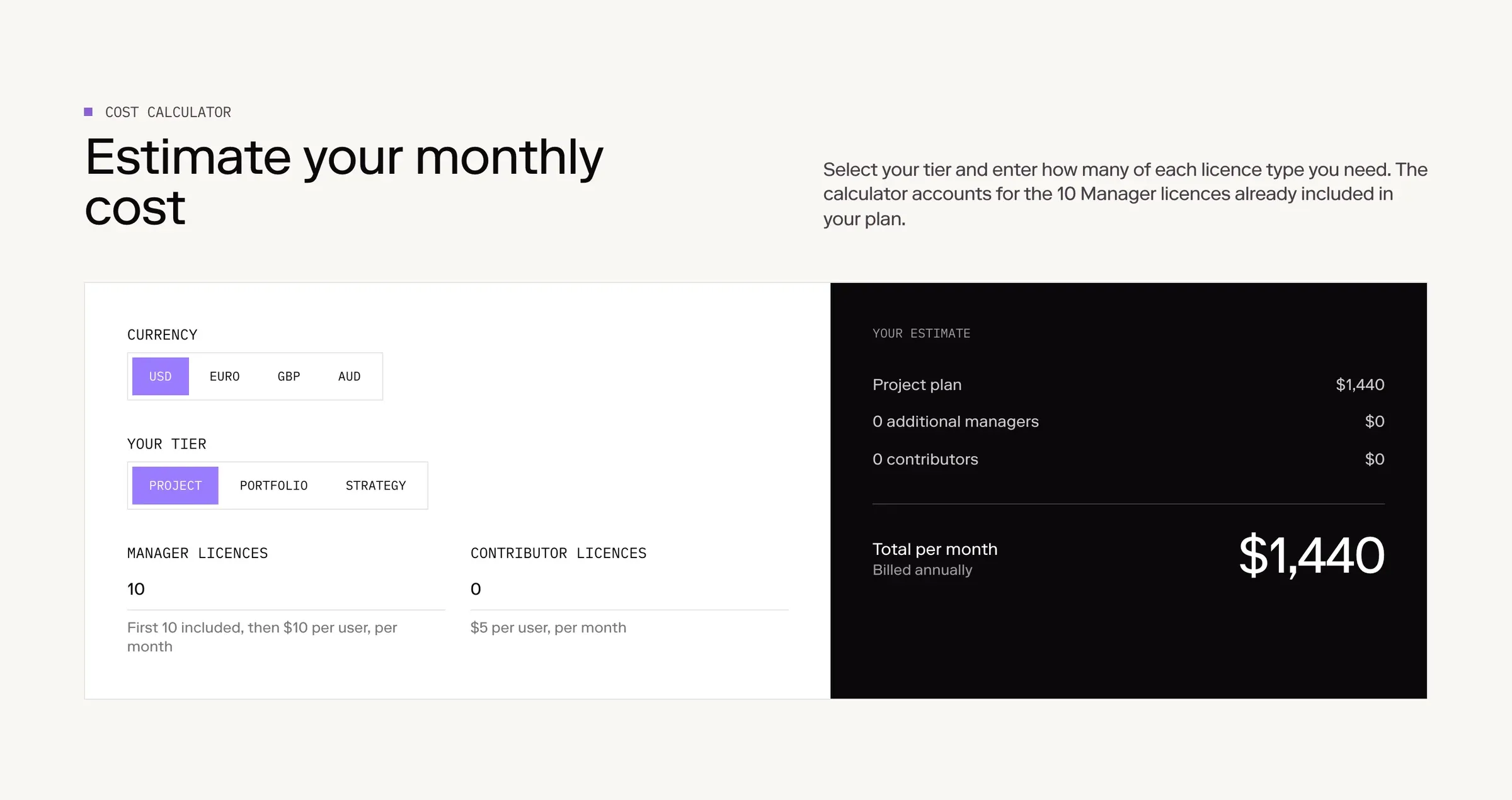
Altus’ pricing calculator: our own code inside a Webflow page, with the content around it edited by the marketing team in Webflow.
How to decide
- How many people publish? A wider marketing team, building pages and running campaigns, points to Webflow. One or two people who would rather ask for changes and review them points to custom code.
- How much does governance matter? If you need roles, review steps and an audit trail across a team, Webflow has them built in.
- How often do you build something new? If the site is a place to test ideas, launch tools and connect systems every week, custom code is quicker.
- Who looks after it? Webflow handles hosting and upkeep. Custom code needs someone to keep it up to date, now and after the people who set it up move on.
Questions we get asked
Is custom code better for SEO than Webflow?
No, not on its own. Both can produce fast pages, clean HTML, sitemaps, redirects and structured data. Custom code makes very light pages easy; Webflow puts the SEO settings in your team’s hands. What matters more is how well the site is set up and kept up, whichever you choose.
Can Claude build our site instead of Webflow?
Yes. Claude Code can build and launch a whole marketing site, as it did ours. It works best from finished designs and written rules, with someone reviewing every change on a preview. If a wider marketing team needs to build pages itself, Webflow is usually the better home.
Can our marketing team still edit a custom-coded site?
Yes, through a headless CMS (the options compared), Markdown files, or by asking an AI assistant for changes and checking them on a preview. It suits one or two people who are close to the site. A team where many people build pages is usually happier in Webflow.
Is custom code cheaper than Webflow?
Hosting can be: Vercel Pro is US$20 a month, against US$25 a month billed yearly for Webflow with the CMS. But more of the work is build time, and someone has to keep the code up to date, so the total depends on how much the site changes after launch.
Can we export our Webflow site’s code?
Partly. On a paid Workspace plan, Webflow can export a site’s HTML and CSS, but CMS content isn’t included; each collection exports separately to CSV. Treat the export as a reference for a rebuild, not a finished site you can host as it is.
What about AI site builders like Lovable?
They build a site as code from a chat, so the same trade-offs apply: very quick to change, and best for a small team that reviews each change. Before choosing one, check how your marketing team will edit pages and who will look after the site (Lovable vs Webflow).
If you’d like help choosing, see our Webflow and custom development service, or tell us about your site.