
Services
Strategy
We find the clearest path from what your business needs to what your website should do.
What’s included
- Page strategy
- Landing page strategy
- Site architecture
- Content planning
- Wireframes
- Migration planning




Branding
We shape a distinct visual identity that works on screen first and carries through everything you make.
What’s included
- Visual identity
- Brand refresh
- Colour & typography
- Moodboards & direction
- Brand guidelines
- Digital brand systems
Recent work


Design
We turn the plan into a distinct, usable design that feels right for your brand and works across every screen.
What’s included
- Website design
- UI design
- Responsive design
- Design systems
- Visual direction
- Content presentation


Development
We build fast, reliable websites in Webflow or with custom code, with the integrations each project needs.
What’s included
- Webflow development
- Custom website development
- Custom interactions
- Performance engineering
- CRM & email integrations
- Booking & payments


SEO & AI search
We make your site easy for search engines and AI assistants to find, understand and point people to.
What’s included
- Technical SEO
- AI search & AEO
- Structured data
- Answer-ready content
- Core Web Vitals
- AI crawler access
Optimisation
We keep improving what happens after launch, using real behaviour data to turn more visitors into enquiries.
What’s included
- Conversion optimisation
- A/B changes
- Landing pages
- Copy reworks
- Analytics & heatmaps
- Monthly improvements
Recent work
Latest
The newest posts, across every topic.



Design
Planning and designing websites, and the tools we use.



Development
Webflow, Astro, Claude Code, CMS choices and what builds really take.

SEO & AI search
Getting found in Google and quoted by AI assistants.


Studio
How we run projects, from proposals to launch week.



Webflow to Astro migration: how to do it
How to move a site from Webflow to Astro: when it makes sense, when to stay, and the steps from CMS export and components to redirects and launch.
- Written by
 Matthew Bishop
- Published
- Reading time
- 6 minutes
A Webflow to Astro migration means rebuilding the site as code: export your CMS content, rebuild the design as Astro components, replace Webflow forms with your own, redirect every URL that changes, then point your domain at the new host. It makes sense when changes already go through a developer or an AI assistant, or the site needs features a visual builder makes hard. If your marketing team builds and publishes pages in Webflow every week, it usually doesn’t. We’ve done the move for Generate, whose Webflow site we built in 2024.
When a move makes sense, and when to stay
Webflow and Astro suit different teams, and most of the sites we build are still on Webflow. The question is who changes the site, and how.
| Move to Astro if | Stay on Webflow if |
|---|---|
| Changes already come through a developer or agency | Your marketers build and publish pages themselves |
| You want to make changes by asking an AI assistant, and check each one on a preview | Your team likes a visual editor and the CMS as it is |
| The site needs custom tools, calculators or integrations | Your pages are built from the components you already have |
| You want the code in your own repository, on any host | You want hosting, security and updates handled for you |
There’s also a middle path. Webflow Cloud hosts Next.js and Astro apps alongside a Webflow site, so a custom tool can live on the same domain as pages your team edits visually (Webflow). For the wider comparison, see Webflow vs Astro.
What it looked like for Generate
Generate’s team runs a community, the Generate Summit and the Ones 2 Watch awards, and on the Webflow site most design changes still came through us. The goal for the new site was speed: pages the team could change themselves.
- Design first. We designed a new design system in Paper, with tokens set up to go straight into code.
- Built as code. The new site is Astro and Tailwind on Vercel, with editing rules for the team’s AI assistant and a preview of every change.
- Content in a CMS. On the Webflow site, the Summit speakers and agenda ran from the Webflow CMS. On the new site, the blog and Summit speakers live in Sanity.
- Forms carried over. The new join and sponsor forms connect to HubSpot.
The new site launched in October 2026.
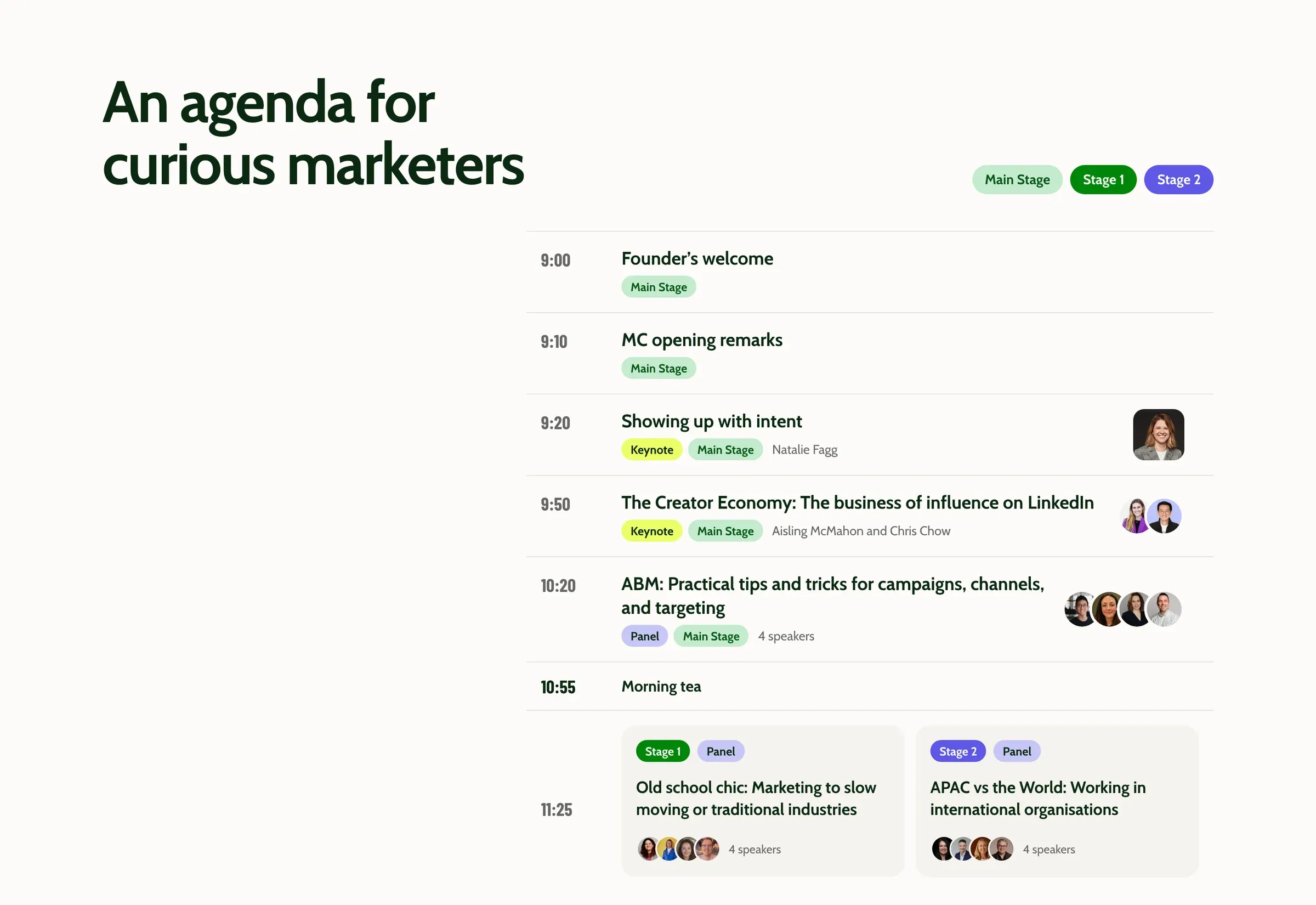
The Summit agenda on Generate’s new site, built with Astro and Tailwind.
How to migrate from Webflow to Astro
1. Take an inventory
List every page, CMS collection and template, and every URL, including collection pages such as posts and speakers. Note the forms, the integrations (CRM, booking, analytics) and the interactions. Pull a list of your URLs from the sitemap and Search Console, so nothing that earns traffic is missed.
2. Export your CMS content
In Webflow, each CMS collection exports to CSV from the CMS panel (Webflow). Download your images and files as well, so nothing is left on Webflow’s hosting when you cancel the site.
Webflow can also export a site’s HTML and CSS on a paid Workspace plan, but CMS content isn’t included (Webflow). Treat the code export as a reference, not the new site.
3. Choose where content lives
Decide who edits what after the move. Content your team changes often, such as posts, events or speakers, suits a headless CMS like Sanity. Content that rarely changes can live as Markdown files in an Astro content collection. We compare the options in the best CMS for Astro, and cover the setup in how to use Sanity with Astro.
4. Rebuild the design as components
A well-built Webflow site already has a system: classes, variables and components. Carry it across rather than copying pages. Webflow variables become design tokens, each Webflow component becomes an Astro component, and each page is assembled from them. Our guide to building a website with Astro covers the setup step by step.
5. Replace forms and interactions
Webflow forms stop working once the site leaves Webflow, so each form needs a new home: a small server function, or a direct connection to your CRM. Generate’s forms post to HubSpot. Rebuild interactions in CSS or a little JavaScript, and only the ones that earn their place.
6. Carry over SEO
Copy each page’s title, meta description and Open Graph image, keep the same URLs where you can, and rebuild the structured data, sitemap and robots.txt. Our Astro SEO guide covers the setup.
7. Map the redirects
Webflow lists its 301 redirects in Site settings, and they can be exported to CSV (Webflow). Move those, plus a redirect for every URL that changes, into your new host’s config. Our website migration SEO guide explains how to keep rankings through the move.
8. Launch, then close the old site
Review every page on a preview, then point the domain at the new host. Check redirects, forms and analytics on the live site, and submit the new sitemap in Search Console. Keep the Webflow site until you’ve downloaded every asset and are sure nothing is missing, then cancel its site plan.
Questions we get asked
Will we lose rankings moving from Webflow to Astro?
Not if the migration is planned for it. Keep URLs the same where you can, redirect every one that changes, carry over titles, descriptions and structured data, and watch Search Console in the weeks after launch. Rankings can move while Google recrawls the site, so plan the launch away from your busiest period.
Can our team still edit the site after moving?
Yes, in a different way. Your team can edit content in a headless CMS such as Sanity, or ask an AI assistant for changes and check each one on a preview, which is how Generate’s team works. If your team wants to build whole pages visually, Webflow is still the better fit.
How long does a Webflow to Astro migration take?
It depends on the number of templates and components, how much CMS content moves and how many integrations need rebuilding. Generate’s new design system was designed in August and September 2026, and the site was built and launched in October.
Do we have to move everything at once?
No. Webflow Cloud can host an Astro app alongside a Webflow site, so you can build a custom tool or section in code while your team keeps editing the rest in Webflow. Move the whole site only when most changes already come through code.
Moving from WordPress instead? See WordPress to Astro migration. Still choosing a framework? Compare Astro vs Next.js, or start with our guide to Astro web development.
If you’re weighing a move, see our website migration service, or tell us about your site.