
Services
Strategy
We find the clearest path from what your business needs to what your website should do.
What’s included
- Page strategy
- Landing page strategy
- Site architecture
- Content planning
- Wireframes
- Migration planning




Branding
We shape a distinct visual identity that works on screen first and carries through everything you make.
What’s included
- Visual identity
- Brand refresh
- Colour & typography
- Moodboards & direction
- Brand guidelines
- Digital brand systems
Recent work


Design
We turn the plan into a distinct, usable design that feels right for your brand and works across every screen.
What’s included
- Website design
- UI design
- Responsive design
- Design systems
- Visual direction
- Content presentation


Development
We build fast, reliable websites in Webflow or with custom code, with the integrations each project needs.
What’s included
- Webflow development
- Custom website development
- Custom interactions
- Performance engineering
- CRM & email integrations
- Booking & payments


SEO & AI search
We make your site easy for search engines and AI assistants to find, understand and point people to.
What’s included
- Technical SEO
- AI search & AEO
- Structured data
- Answer-ready content
- Core Web Vitals
- AI crawler access
Optimisation
We keep improving what happens after launch, using real behaviour data to turn more visitors into enquiries.
What’s included
- Conversion optimisation
- A/B changes
- Landing pages
- Copy reworks
- Analytics & heatmaps
- Monthly improvements
Recent work
Latest
The newest posts, across every topic.



Design
Planning and designing websites, and the tools we use.



Development
Webflow, Astro, Claude Code, CMS choices and what builds really take.
SEO & AI search
Getting found in Google and quoted by AI assistants.



Studio
How we run projects, from proposals to launch week.



Webflow auto translate vs Google Translate
How Webflow's auto translate works (one-time or continuous), how it compares with a Google Translate widget, what it costs, and what still needs a person.
- Written by
 Matthew Bishop
- Published
- Reading time
- 6 minutes
Webflow can translate your site automatically. With the Localize add-on, its AI translation, which Webflow calls agentic translation, translates pages, page metadata, components and CMS content into real pages in their own folder, such as /de. Search engines can find those pages, and your team can review them before they go live. A Google Translate widget did something different: it translated the page in the visitor’s browser, so search engines never saw a translated page and nobody checked the result. Google stopped offering the widget to new sites years ago and has announced the end of its support.
We set up German for Altus with Webflow Localize, and more than 100 German pages now sit beside the English ones. Here’s how Webflow’s auto translate works, and how it compares.
How they compare
| Webflow auto translate | Google Translate widget | |
|---|---|---|
| What it creates | Real pages for each language, in their own folder | A translation shown in the visitor’s browser |
| Search engines | Can index each language, with hreflang tags | See only the original language |
| Review before visitors see it | Yes: translate, review and edit before publishing | No |
| Your terms and tone | Glossary, tone and formality settings | None |
| Page titles and descriptions | Translated and editable per language | Not translated for search |
| Cost | Localize from US$9 a month per language, billed yearly | Was free; closed to new sites |
Webflow’s pricing from webflow.com/pricing on 5 November 2026. Visitors can still translate any page themselves with their browser’s built-in translation.
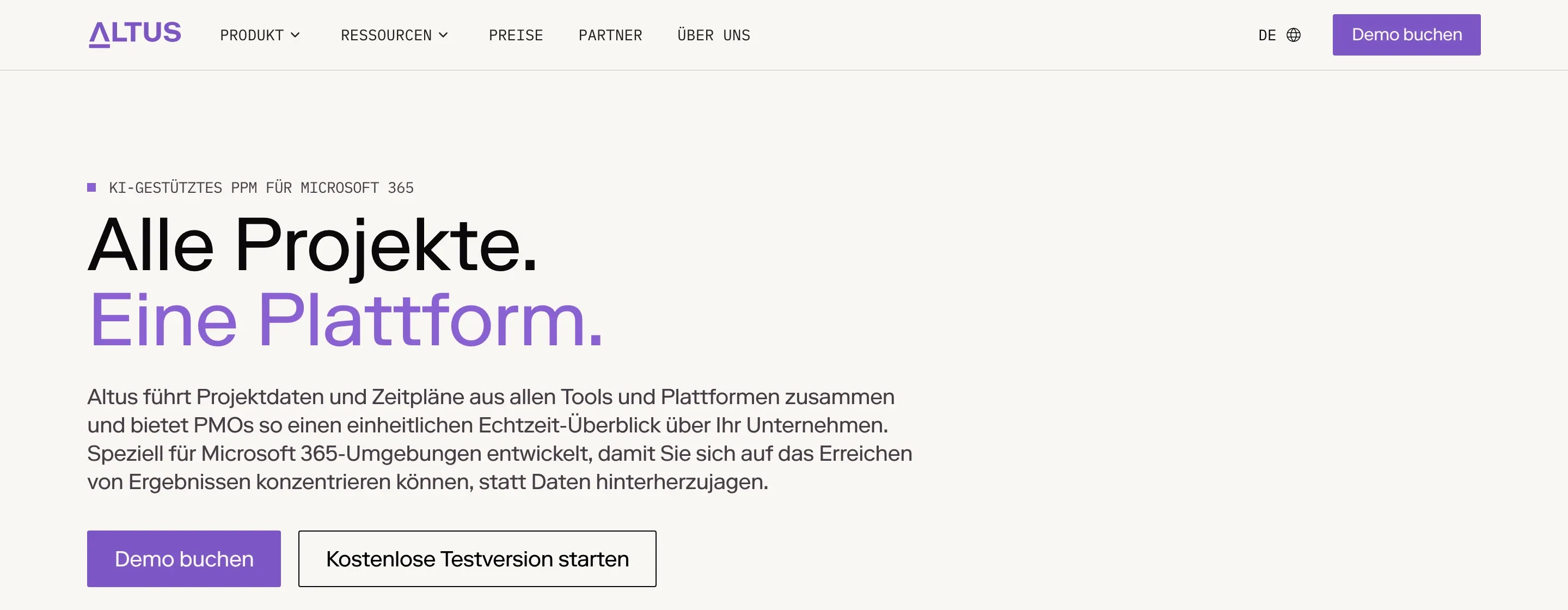
Altus’s German home page, under /de. A real page search engines can index, translated and reviewed in Webflow.
How Webflow’s auto translate works
When you add a language, it starts as a copy of your main site. Agentic translation, available on every paid Localize plan, then translates supported text in pages, page metadata, components and CMS content (Webflow). You choose one of two modes for each language:
| One-time | Continuous | |
|---|---|---|
| Content not yet translated | Translated | Translated, using the main language as the source |
| New content | Translated while the mode is on | Translated while the mode is on |
| When the main language changes | Existing translations stay as they are | Translations update to match |
| Editing translations yourself | Yes | No: you change the main content or the translation settings |
From Webflow’s “Translate your site content” guide, read 5 November 2026.
Translation runs when you open a page or CMS item in the new language, when you finish editing something in the main language, or when you publish through a supported workflow. It doesn’t translate the whole site at once in the background, and you can translate and review while the language is still unpublished.
One-time or continuous?
- Choose one-time if a person edits the translations. A fluent reviewer can correct product terms and tone, and their edits stay. New pages are still translated automatically.
- Choose continuous if the main language should drive everything. Edit the English, and the German follows. You guide it with glossary, tone and formality settings rather than editing words directly.
Be careful switching to continuous: Webflow warns it can replace existing translations, including ones your team wrote.
What still needs a person
AI translation is a strong first draft. Before a language goes live, have a fluent speaker check:
- Product and industry terms. Add them to a custom glossary so they’re translated the same way every time, or not at all.
- Anything legal, such as privacy policies and terms, which may need to be written for that country rather than translated.
- Page titles and descriptions, written for how people search in that language, not word for word.
- The layout. German often runs longer than English, so check buttons, headings and the navigation.
- Forms and emails outside Webflow, such as CRM forms and confirmation emails, which Webflow doesn’t translate.
At Altus, German went live once the translations were ready, not the day the language was added. Budget the review time, not just the setup.
What happened to the Google Translate widget?
Google stopped offering its free Website Translator widget to new commercial sites in 2019, and announced that it would no longer support the widget from 1 October 2026 (Killed by Google issue, quoting Google’s notice). For SEO it never helped: translations happened in the visitor’s browser, so there were no translated pages to rank.
If a visitor wants to read your site in a language you don’t offer, their browser can already translate it. Chrome, Edge and Safari all include page translation.
What it costs
Localize is priced per added language, on top of the site plan, billed yearly as of 5 November 2026:
- Essential, US$9 a month: up to 3 languages, with 10,000 AI-translated words per language a month.
- Advanced, US$29 a month: up to 10 languages, 50,000 words per language a month, plus translated page addresses and automatic visitor routing.
The bigger cost is usually the review: someone fluent checking every page before it publishes. Webflow Localization: how to set it up covers the full setup.
Questions we get asked
Does Webflow translate websites automatically?
Yes, with the Localize add-on. Its agentic translation translates pages, page metadata, components and CMS content into each language you add, in one-time or continuous mode. You can review and edit translations before publishing each language.
Can I add Google Translate to a Webflow site?
Not in a way worth doing. Google closed its free website translation widget to new commercial sites in 2019 and announced the end of support from 1 October 2026. It also never created pages search engines could index. Webflow Localize, or a translation app, creates real translated pages.
Is Webflow’s AI translation good enough to publish?
As a first draft, usually. Have a fluent speaker review product terms, legal pages and page titles before publishing, and add your terms to a glossary so they stay consistent. Altus’s German went live once its translations were ready, not on the day it was added.
Does auto translation help SEO?
Webflow’s does, because each language becomes real pages with their own addresses and hreflang tags, which search engines can index and show to the right audience. A browser-based widget doesn’t, because search engines only ever see the original language.
How much does Webflow auto translate cost?
It’s part of the Localize add-on: US$9 a month per language on Essential, with 10,000 AI-translated words a month, or US$29 on Advanced, with 50,000, billed yearly as of 5 November 2026, on top of the site plan.
If you’re planning a new language, see our Webflow and custom development service, or tell us about your site.